
← Back to the SYMPHONICS card · All how-to pages
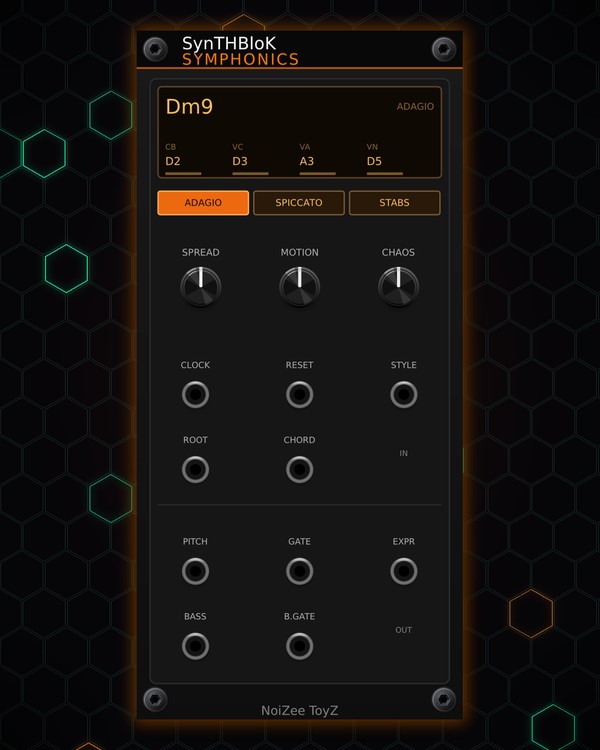
How to use
SYMPHONICS
NoiZee ToyZ pack · coming soon to VCV
What it does
SYMPHONICS is a four-voice string section that sends CV, not sound: contrabass, cello, viola and violin. It follows the song's chords with real voice leading (the voices stay in their ranges, never cross, avoid parallel fifths and octaves, and the violin moves against the bass) and plays them in one of three styles.
Its pitch, gate and expression come out as 4-channel poly cables, so one poly synth voice plays the whole section. The contrabass also has its own pitch and gate jacks.
Quick start
- Patch a 16th-note clock into CLOCK (and your reset into RESET). SYMPHONICS only moves on clock pulses.
- Patch PITCH and GATE to a poly synth voice, and EXPR to its level or filter CV for the swells.
- In a RANDROYD track it gets the song's four chords, and MTX COMPOSER picks which one plays. Without them, patch a 1V/oct note into ROOT and pick the chord type with CHORD.
- Pick ADAGIO, SPICCATO or STABS.
- Shape the voicing with SPREAD, MOTION and CHAOS.
Controls
Style
- ADAGIO: legato, held notes that swell up over about two bars after each chord change.
- SPICCATO: driving 8th-note pulses on cello and viola over a held bass and a slow violin.
- STABS: short marcato hits on the beats.
- STYLE jack: 0-10 V picks the style instead of the keys.
Voicing
- SPREAD: how high the violin sits.
- MOTION: how far the inner voices (cello, viola) move. Low = they hold common notes between chords.
- CHAOS: bass inversions (the bass takes the chord's 5th now and then) and bigger leaps.
Chords
- ROOT: when patched, its note (1V/oct) is the chord root and overrides the song's chords.
- CHORD: with ROOT patched, 0-10 V picks the chord type: min, maj, m7, 7, maj7, sus2, sus4 or power.
- Screen: the chord name (or REST), the style, and each voice's note (CB, VC, VA, VN) with a bar for its swell.
Outputs
- PITCH, GATE, EXPR: 4 channels each (contrabass, cello, viola, violin). EXPR is 0-10 V, the bow swell.
- BASS, B.GATE: the contrabass alone, for a separate bass voice.
Jacks
Inputs
- Clock 16th notes
- Reset
- Chord root 1V/oct; overrides RANDROYD's chords
- Chord quality 0-10 V: min, maj, m7, 7, maj7, sus2, sus4, power
- Style CV 0-10 V: adagio, spiccato, stabs
Outputs
- Pitch 4 channels: contrabass, cello, viola, violin; 1V/oct
- Gate 4 channels
- Expression 4 channels, 0-10 V: bow / breath swell
- Contrabass pitch 1V/oct
- Contrabass gate
N = 1, 2, 3 ... (one jack per track, channel or strip). Hover a jack in Rack for the same text.
Tips
- MTX COMPOSER treats SYMPHONICS like any MTX module: its patterns 1-4 are the song's four chords, 5-7 the same chords again, and 8 a rest (the screen says REST).
- Layer it over an MTX-DUO bass, run BASS and B.GATE into a deeper voice of its own, and finish with BLOKMASTER.
- EXPR into a VCA's CV is what makes ADAGIO swell; into a filter cutoff it brightens the bow on each note.