
← Back to the Stereo Phaser card · All how-to pages
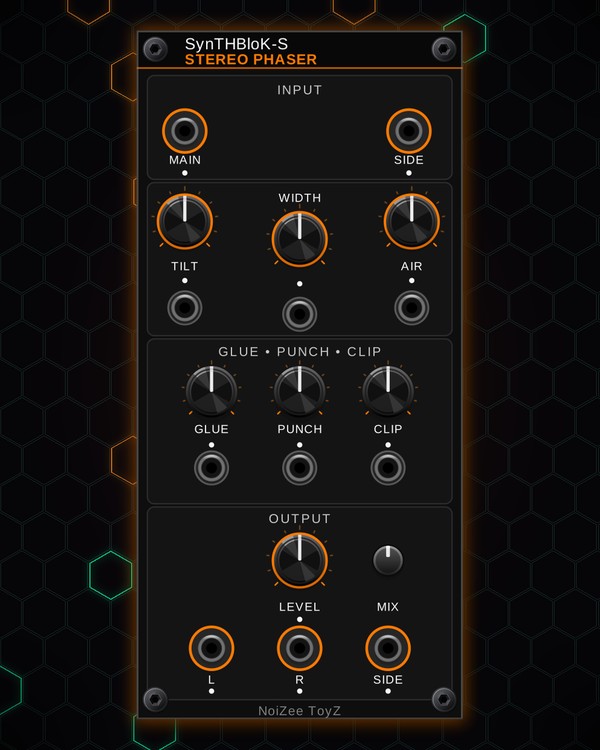
How to use
Stereo Phaser
FREE · download it from its card
What it does
Stereo Phaser turns a mono signal into a wide stereo one and finishes it like a bus processor: width, tilt EQ, air, glue compression, punch and soft clipping, in one panel. The low end stays narrower and centred while the top opens out.
A small analyzer at the top shows the left / right balance and width, the correlation, the mid and side levels and the tilt.
Quick start
- Patch a mono sound (a voice, a synth line or a mix) into the Main input (top left).
- Patch the L and R outputs to your mixer.
- Turn WIDTH up past centre to spread it out, and watch the analyzer.
- Add AIR for sparkle, GLUE to hold it together, and set the level with the output knob.
Controls
Stereo and tone
- WIDTH: how wide the stereo image is. Centre is the default; left narrows it, right spreads it (the lows widen less than the highs).
- TILT: tips the tone around the middle: left is darker, right is brighter.
- AIR: lifts the very top end for sparkle.
Dynamics
- GLUE: bus compression that pulls the sound together. It also sets how far the sound ducks under the Side input.
- PUNCH: brings the attacks (transients) forward.
- CLIP: soft saturation, from warm to driven.
Output
- Output level (the knob above the outputs): the volume at L and R.
- MIX: dry / wet. Fully up is all processed; turn it down to blend the plain mono signal back in.
- Side output: the stereo side signal on its own.
CV and sidechain
- Every effect knob (WIDTH, TILT, AIR, GLUE, PUNCH, CLIP) has a CV jack below it.
- Side input (top right): patch a kick or any other signal here and the output dips while it plays, as far as GLUE allows.
- The small lights show each knob's position (with its CV) and the signal on each jack.
Jacks
Inputs
- Main
- Side
- Width CV
- Tilt CV
- Air CV
- Glue CV
- Punch CV
- Clip CV
Outputs
- Left
- Right
- Side
N = 1, 2, 3 ... (one jack per track, channel or strip). Hover a jack in Rack for the same text.
Tips
- Put it on the end of any chain before BLOKMASTER, or on the MIX Fire aux bus to widen pads from POLY and QUAD.
- For pumping pads: patch the kick into the Side input and turn GLUE up.
- Keep WIDTH modest on bass: the lows stay centred anyway, and too much width can make a mix sound thin.