
← Back to the Snare/Hat card · All how-to pages
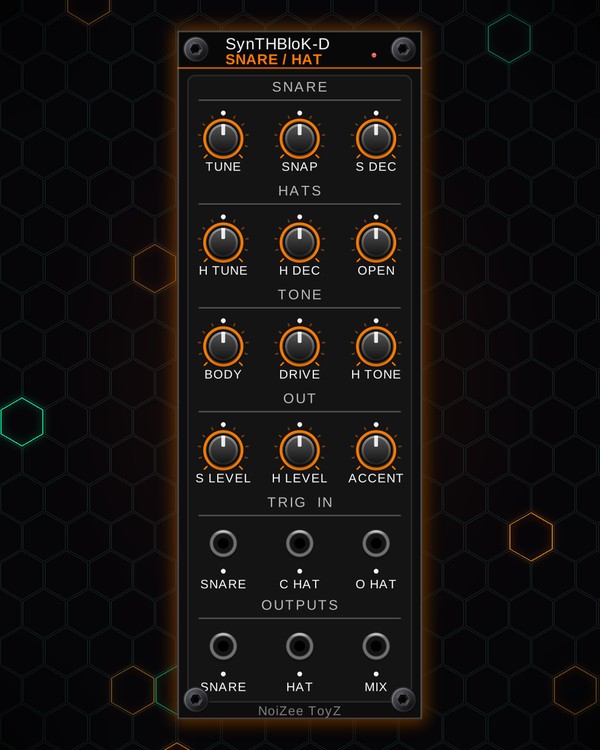
How to use
Snare/Hat
FREE · download it from its card
What it does
Snare/Hat is a techno snare and hi-hat voice in one panel. The snare is two tuned oscillators for the body plus filtered noise for the snap. The hats are six metallic square-wave oscillators through a high-pass filter, with a closed and an open hat.
Each part has its own trigger jack. The closed and open hats share one voice, so a closed hat cuts off a ringing open hat, like on a real drum machine.
Quick start
- Patch triggers into SNARE, C HAT (closed hat) and O HAT (open hat) under TRIG IN. Euclid's four channels or MTX-1's tracks work well.
- Patch MIX to your mixer or audio out, or use SNARE and HAT under OUTPUTS for separate channels.
- No sequencer handy? Right-click the panel: Trigger snare, Trigger closed hat or Trigger open hat (audition) plays one hit.
- Tune the snare with TUNE and SNAP, and the hats with H TUNE and H TONE.
- Set the lengths: S DEC for the snare, H DEC for the closed hat, OPEN for the open hat.
Controls
Snare
- TUNE: the pitch of the snare body (120-400 Hz).
- SNAP: how much noise is in the snare. Up = more rattle and less body.
- S DEC: how long the snare rings (60-500 ms).
Hats
- H TUNE: the pitch of the metal sound.
- H DEC: how long the closed hat rings (10-150 ms).
- OPEN: how long the open hat rings (150 ms to 1.2 s).
Tone
- BODY: the colour of the snare's noise. Low = darker, high = brighter.
- DRIVE: saturation on the snare (the hats stay clean).
- H TONE: the hats' high-pass filter (3-10 kHz). Up = thinner, sizzlier hats.
Out
- S LEVEL and H LEVEL: the snare and hat levels.
- ACCENT: lets the trigger's voltage set how hard each hit is. A 10 V trigger = full hit, lower voltages = softer. At zero, every hit is full no matter the voltage.
Lights and menu
- The lights over the knobs go from yellow to deep red as you turn them up. The lights under the jacks glow orange for positive voltage and blue for negative. The small light at the top flashes with each hit.
- Right-click menu: Trigger snare (audition), Trigger closed hat (audition) and Trigger open hat (audition).
Jacks
Inputs
- Snare trigger
- Closed hat trigger
- Open hat trigger
Outputs
- Snare
- Hat
- Mix
N = 1, 2, 3 ... (one jack per track, channel or strip). Hover a jack in Rack for the same text.
Tips
- Put the open hat on the off-beats and closed hats around it: each closed hat chokes the open one, so the open hat only rings until the next closed hit.
- For accents, feed the trigger jacks from a source that sends different voltages per step, then turn up ACCENT.
- Pairs well with Kick on the same Euclid clock. Send HAT through CHARACTER DELAY or RESONATOR for movement.