
← Back to the RANDROYD card · All how-to pages
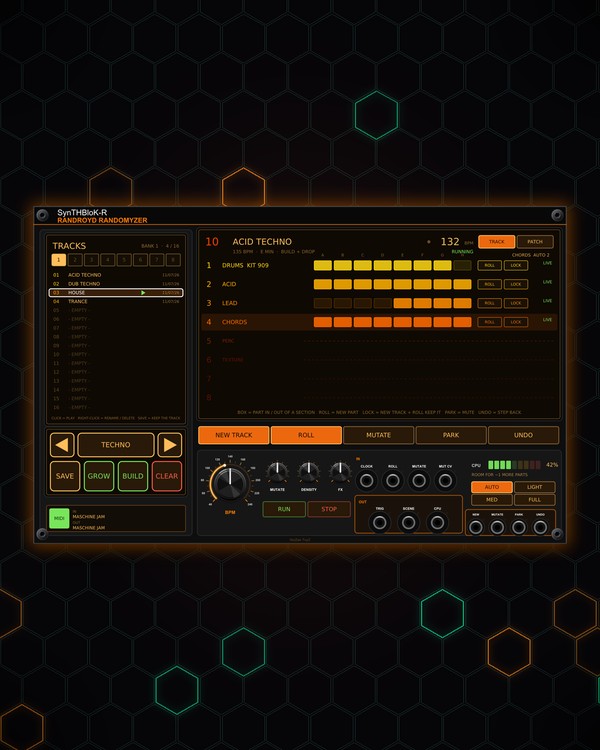
How to use
RANDROYD
NoiZee ToyZ pack · coming soon to VCV
What it does
RANDROYD is a track generator. Pick a genre and press NEW TRACK: it builds the rack (sequencers, synths, drums, effects, a mixer and MTX COMPOSER), writes a whole song into it in one key and tempo, and arranges it across COMPOSER's eight sections A-H.
A track has up to eight parts: drums, bass, lead, chords, percussion, texture, a counter-melody and a second percussion layer (tops). ROLL and MUTATE rework the song, GROW adds what it is missing, and a CPU guard keeps the rack from overloading. Save your favourites in 8 banks of 16 tracks.
Quick start
- Pick a genre with the ◀ / ▶ arrows under the track list (or the scroll wheel), then press the genre key in the middle (it says CONFIRM while you pick).
- Pick a size: AUTO, LIGHT, MED or FULL.
- Press NEW TRACK. The big screen shows the song (genre, tempo, key) and its parts. Press RUN to play it from the top.
- Not quite right? ROLL gives the playing track new sounds; MUTATE makes variations on every part. UNDO takes a step back.
- Like it? Press SAVE, then click a spot in the track list.
Controls
Making a track
- Genre (◀, the genre key, ▶): the list opens on the left screen, A-Z in two columns. Click a genre or step with the arrows, then CONFIRM (or click the big name). Without CONFIRM, it closes unchanged after 30 seconds.
- AUTO, LIGHT, MED, FULL: how many parts. LIGHT = drums + bass, MED adds lead and chords, FULL the rest. AUTO picks by how much CPU this computer has left (it learns what a part costs here).
- NEW TRACK: a whole new song in the genre. It plays unsaved until you SAVE it.
- ROLL: new sounds for the playing track. With no track, it patches smart random cables between the modules in the rack.
- MUTATE: variations on every part (with no track: re-rolls part of the cables). The MUTATE knob sets how much changes.
- DENSITY: how many cables a roll makes, and how many parts a track gets.
- FX: how wet new tracks are.
- UNDO: Rack's undo, one step back.
Song
- BPM: the song's tempo (40-240). MTX COMPOSER follows it; a new track sets it.
- RUN: starts the song from the top (also while it plays). STOP stops it. The screen shows RUNNING or STOPPED and the tempo.
- PARK: parks the selected part (bypassed, so it uses no CPU). Click a part's row to select it; click a parked part's row to wake it.
The track screen (big screen)
- TRACK: the playing track's parts, one row each, with their modules, mixer channels and LIVE / PARKED.
- A-H boxes on each row: lit where the part plays. Click one to switch that part on or off in that section; COMPOSER takes it at once.
- ROLL (on a row): new sounds for that part only.
- LOCK (on a row): a locked part is kept by NEW TRACK, ROLL and MUTATE. Locking a melodic part keeps the key and chords too.
- CHORDS (top right): how many bars each chord lasts: AUTO, 1, 2, 4 or 8 bars. Click to step.
- PATCH: the modules and cables RANDROYD sees in the rack.
Saved tracks (left screen)
- BANK 1-8 along the top, 16 spots under them. Click a saved track to play it; right-click it to play, rename or delete it.
- SAVE: every spot flashes (the playing track's own spot flashes fast); click one to save there. Press SAVE again to cancel.
- CLEAR: click a saved spot twice to delete it, or the lit bank twice to delete the whole bank. Deleting can't be undone. Right-click CLEAR empties the rack of RANDROYD's parts.
- GROW: adds what the song is missing: first a missing part (built in the song's key and chords), then SYMPHONICS strings, then effects, as long as the CPU has room.
- BUILD / RACK: switches mode. BUILD: every NEW TRACK builds its parts fresh. RACK: one rack stays, NEW TRACK writes a new song into it and GROW adds a module.
CPU
- CPU meter: how busy the rack is, and roughly how many more parts fit. The CPU jack sends it as a voltage.
- CPU guard: at 95 % RANDROYD parks parts to stop crackles, the last-added first (the drums keep playing). They show PARKED and CPU GUARD on the rack; click a part's row to wake it, or pick a smaller size. Turn the guard off in the right-click menu.
Right-click menu
- SAFE: leave VCV Core (Audio / MIDI) modules alone when rolling cables. CHAOS: any jack to any jack, loops allowed (wild, can get loud).
- CPU GUARD on or off, and Forget this computer's CPU measurements.
- Cable clean-up: clear RANDROYD's cables, clear rolled cables only, unlock mixer channels, or make the rolled cables yours.
- Recover the last unsaved track and Delete all saved tracks.
Jacks
Inputs
- Clock scene changes land on the bar
- Roll trigger
- Mutate trigger
- Mutate CV 0 to 10 V, added to the knob
- New track trigger
- Park trigger park / wake the live track
- Undo trigger
Outputs
- Trigger after each roll / scene change
- Scene 0 V = scene 1 ... 7 V = scene 8
- CPU load 10 V = 100 %
N = 1, 2, 3 ... (one jack per track, channel or strip). Hover a jack in Rack for the same text.
Tips
- Once a track plays, grab any knob: RANDROYD and MTX COMPOSER leave a module you touched alone until the next NEW TRACK. LOCK a part you love and keep rolling the rest.
- The jacks along the bottom (NEW, MUTATE, PARK, UNDO, plus ROLL and MUTATE by the clock) take triggers: drive RANDROYD from a pad controller or a sequencer. TRIG sends a trigger after each roll.
- After a NEW TRACK, shape it with MORPH (snapshots that glide on section changes), GRIT and GLITCH-ECHO.