
← Back to the QUAD card · All how-to pages
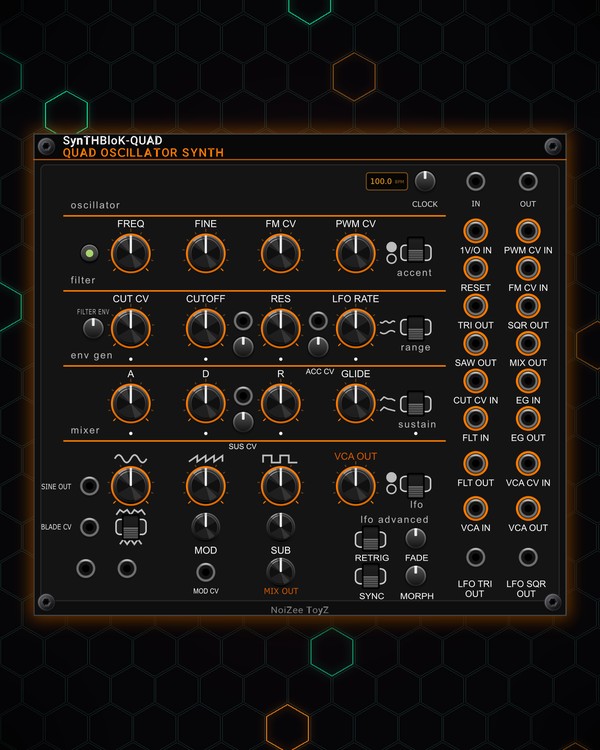
How to use
QUAD
FREE · download it from its card
What it does
QUAD is a complete synth voice: up to four oscillators per note (triangle, saw or the grittier Blade saw, square and a sub), a driven four-pole filter with its own envelope, an envelope with glide and accent, and an LFO. It plays up to eight notes from a polyphonic pitch cable.
It has its own clock (with a BPM screen) for syncing the LFO, and a stereo output where the stacked oscillators fan out left and right.
Quick start
- Patch a pitch CV (1 V/oct) into 1V/O IN and a gate into EG IN, for example from PLAYER PLUS or a sequencer. The envelope only opens on a gate, so you need both.
- Patch the stereo OUT pair at the bottom left to your mixer (or use the mono VCA OUT).
- Set the sound with the mixer knobs (triangle, saw, square) and SUB.
- Shape it with CUTOFF, RES and FILTER ENV, then A, D and R.
- Press the voice button (the 1V-4V screen) to stack more oscillators per note for a thicker sound.
Controls
Oscillators
- 1V-4V button: how many oscillators play each note (1 to 4). They drift and spread apart like an analog stack.
- FREQ and FINE: coarse and fine tuning.
- FM CV: how much the FM CV IN jack moves the pitch. It also adds a little LFO wobble to the pitch.
- PWM CV: the square's pulse width. With PWM CV IN empty, the LFO moves the width.
- Saw / Blade switch: plain saw, or the Blade (a shaped, gritty saw). MOD sets how much the MOD CV jack (or the LFO, when that jack is empty) bends the Blade. BLADE CV feeds a signal straight into it.
Mixer
- Level knobs (triangle, saw, square) and SUB: the blend going into the filter. The sub is mostly a clean sine for weight.
- MIX OUT knob: the level of the raw oscillator mix at the MIX OUT jack. TRI, SQR, SAW and SINE OUT give each wave on its own.
Filter
- CUTOFF and RES: the four-pole filter. Near the top of RES it starts to scream (self-oscillate).
- FILTER ENV: how far the envelope opens the cutoff on each note.
- CUT CV: how much the CUT CV IN jack moves the cutoff. With that jack empty, it is the depth of an LFO wobble on the cutoff.
- Keytrack trimpot (between CUTOFF and RES, with its own CV jack): moves the cutoff along with the key CV, up or down.
- FLT IN / VCA IN: patch outside audio here to run it through the filter and VCA in place of the oscillators.
Envelope and VCA
- A, D, R and the sustain trimpot: the envelope. The sustain switch picks ADR (no sustain, decays to zero) or ADSR. SUS CV moves the sustain level.
- GLIDE: slides the pitch from note to note.
- VCA OUT knob: output level. VCA CV IN turns the VCA down by CV (0-10 V).
- EG OUT: the envelope as CV, for other modules.
Accent
- accent switch: turns accent on or off.
- Accent trimpot and ACC CV: accent opens the cutoff a little, pushes the filter drive and makes the note louder. Patch accents from your sequencer into ACC CV.
LFO
- LFO RATE, the speed switch (slow or fast range) and the lfo switch (on / off).
- FADE: when the LFO is switched on, it fades in over this time.
- MORPH: sweeps the LFO shape (sine, triangle, saw, square, S-curve).
- RETRIG: on = every new note starts the LFO from the top, with its fade-in, so each note gets the same sweep.
- SYNC: locks the LFO to the clock. LFO RATE then picks the length, from one beat per cycle up to 32 beats.
- LFO TRI and LFO SQR: the LFO as CV, for other modules.
Clock
- CLOCK trimpot: the internal tempo, shown on the BPM screen. CLOCK OUT sends a pulse every beat.
- CLOCK IN: patch a clock (one pulse per beat) and the screen shows its tempo (EXT until it has measured it); the knob is dimmed.
Right-click menu
- Voice: Filter drive (how hard the mix hits the filter) and Unison spread (how far the stacked oscillators detune and how wide the stereo gets).
Jacks
Inputs
- Keytrack CV
- 1V/oct
- PWM CV
- Reset
- FM CV
- Clock
- Cutoff CV
- Envelope generator
- Sustain CV
- Filter
- VCA CV
- VCA
- Waveform mod CV
- Blade CV
- Accent
Outputs
- Triangle
- Square
- Saw
- Mix
- Envelope generator
- Filter
- VCA
- Stereo left
- Stereo right
- Sine
- LFO triangle
- LFO square
- Clock
N = 1, 2, 3 ... (one jack per track, channel or strip). Hover a jack in Rack for the same text.
Tips
- Feed it from EUCLID gates or PLAYER PLUS notes, then run it through DUAL FILTER or MORPH FILTER and into CHARACTER DELAY.
- For a wobble bass: leave CUT CV IN empty, turn up CUT CV, switch SYNC on and pick the length with LFO RATE.
- Patch a polyphonic pitch and gate cable (up to eight notes) for chords; each note gets its own envelope.
- Two to four oscillators with Unison spread turned up in the right-click menu gives a supersaw width on the stereo OUT pair.