
← Back to the PULSE card · All how-to pages
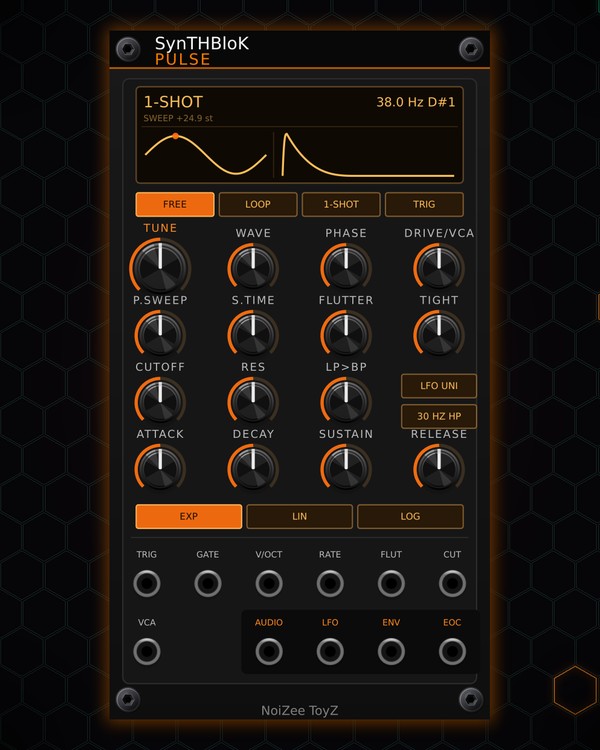
How to use
PULSE
FREE · download it from its card
What it does
PULSE is an LFO and a VCA voice in one. A single oscillator runs from 0.01 Hz up to audio, with a wave that morphs from sine to triangle, saw and square, a pitch sweep, a looping ADSR, a low-pass / band-pass filter, drive and tape flutter.
Three modes decide how it plays: FREE is a plain free-running LFO or drone, LOOP cycles its envelope by itself, and 1-SHOT plays from a trigger or a gate. That covers an 808 sub under the kick, a flutter bass, a swelling pad or a slow wobble on a filter. It is polyphonic: patch a poly TRIG, GATE or V/OCT and it plays up to 16 voices.
Quick start
- Patch AUDIO to your mixer. PULSE starts in 1-SHOT with a deep sub-kick sound.
- Patch your kick trigger (or any drum trigger) into TRIG, or click the TRIG key to hear it.
- Turn TUNE to set the pitch; the screen shows the Hz and the note.
- Pick a starting sound from the right-click menu, Presets: ULTRA-LOW KICK, SMOOTH SUB, FLUTTER PAD, 808 BOOM, SUB DROP, WOBBLE LFO, TREMOLO LFO or PSY CHIRP.
- For an LFO, press FREE and patch LFO to a filter cutoff or anything else that takes CV.
Controls
Mode and trigger
- FREE: a free-running LFO or drone; the VCA stays open. A trigger or gate restarts the wave and the sweep and runs the envelope (on ENV).
- LOOP: the envelope plays attack, decay, release over and over, restarting the wave and sweep each time. With GATE patched it loops only while the gate is high.
- 1-SHOT: a trigger plays attack, decay, release; a gate plays the full ADSR and holds SUSTAIN while it is high.
- TRIG key: triggers every voice, like a trigger at the TRIG jack. It lights on each trigger.
- Screen: the mode, the pitch (Hz and note), the sweep and flutter amounts, one cycle of the wave and the envelope shape, each with a dot that follows the sound.
Oscillator
- TUNE: the pitch, from 0.01 Hz to 8 kHz. V/OCT and RATE add to it (1 V per octave).
- WAVE: sine, triangle, saw, square, morphing between neighbours.
- PHASE: where a trigger restarts the wave. 90° gives a punchy sub-kick click, 0° a clean start.
- DRIVE/VCA: the level. Clean up to 1, saturation above; the output stays under ±5 V.
Sweep and flutter
- P.SWEEP: a pitch drop (or rise) on every restart, ±48 semitones.
- S.TIME: how long the sweep takes to settle.
- FLUTTER: tape wow and flutter (a pitch wobble and a little level wobble). The FLUT jack adds to it (10 V = full).
- TIGHT: loose = a slow wandering wobble, tight = a fast shallow buzz.
Filter
- CUTOFF, RES: the filter. CUT jack: 1 V per octave on the cutoff.
- LP>BP: morphs the filter from low-pass to band-pass.
- LFO UNI: lit = the LFO out is 0..10 V; off = ±5 V.
- 30 HZ HP: lit = rolls off the rumble under 30 Hz on the AUDIO out.
Envelope
- ATTACK, DECAY, SUSTAIN, RELEASE: the ADSR, from half a millisecond to 30 seconds per stage.
- EXP, LIN, LOG: the envelope's curve.
- VCA jack: 0-10 V opens the output level.
Jacks
Inputs
- Trigger restarts the wave + sweep + envelope
- Gate ADSR; in LOOP: loops while high
- V/Oct
- Rate CV 1 V/oct
- Flutter CV 10 V = full depth
- Cutoff CV 1 V/oct
- VCA CV 0-10 V
Outputs
- Audio
- LFO the raw wave, before the filter / VCA
- Envelope 0-10 V
- End of cycle trigger
N = 1, 2, 3 ... (one jack per track, channel or strip). Hover a jack in Rack for the same text.
Tips
- Put PULSE under KICK for a sub: same trigger into TRIG, then tune it to your song's key with TUNE.
- For a wobble, set FREE, patch LFO into MORPH FILTER's or DUAL FILTER's cutoff, and set the speed with TUNE. A CV into RATE speeds it up or slows it down (1 V = twice as fast).
- EOC sends a trigger at the end of each cycle (FREE: every wave cycle; LOOP: every envelope cycle; 1-SHOT: when the release ends). Patch it into another module's trigger, or back into a second PULSE, for chains.
- Finish the level with MIX FIRE. RANDROYD rolls PULSE into its bass tracks.