
← Back to the Poly card · All how-to pages
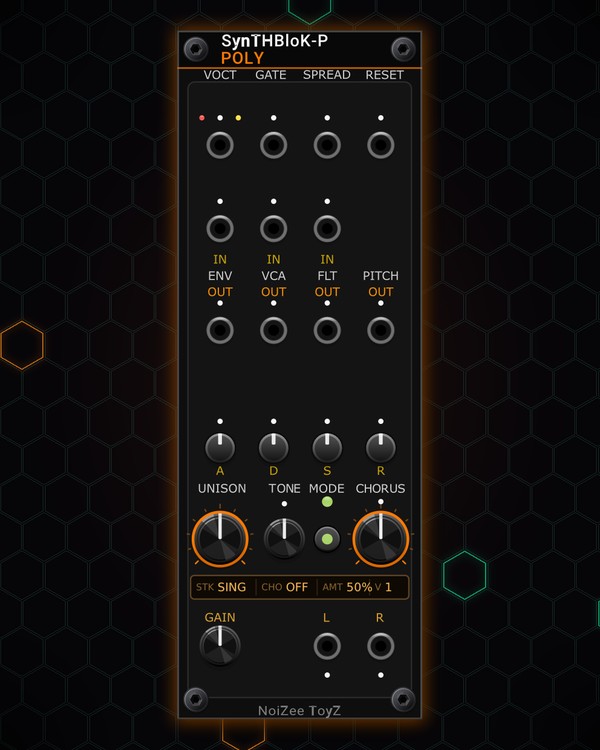
How to use
Poly
FREE · download it from its card
What it does
Poly is a polyphonic synth voice for chords and pads: up to eight voices, one per channel of the pitch and gate cables you patch in. Each voice is a stack of drifting saws (a single note, or fifths, octaves and chords), with its own envelope and a warm filter set by TONE.
After the mix comes a stereo chorus with four modes. The screen shows the stack, the chorus mode, the chorus amount and how many voices are playing.
Quick start
- Patch a polyphonic pitch cable into VOCT and the matching gate cable into GATE, for example from PLAYER PLUS or a MIDI-CV module.
- Patch L and R at the bottom to your mixer.
- Play a chord and set the envelope with A, D, S and R.
- Turn UNISON to pick a stack (SING, 5TH, OCT, MAJ, MIN, FULL and more) and TONE to make it darker or brighter.
- Press MODE to switch the chorus on (LITE, WIDE or ENS) and set its depth with CHORUS.
Controls
Voices
- UNISON: the stack each voice plays: Single, 5th, Octave, 5th + octave, Two octaves, Minor, Major, Octave + 5th, Stacked 5ths, Stacked octaves or Full. Stacks further round the knob also detune the voices against each other a little more.
- TONE: the voice filter, from dark (left) to bright (right).
- SPREAD (jack): detunes the voices against each other by CV.
- RESET (jack): a trigger restarts every oscillator together.
Envelope
- A, D, S, R: the envelope every voice plays on its gate. The four lights show which stage is running.
- ENV IN: patch a polyphonic envelope (0-10 V) here to replace the built-in one.
Inputs
- VCA IN: turns all voices down by CV (0-10 V).
- FLT IN: polyphonic audio fed into each voice's filter along with the oscillators.
Chorus and output
- MODE: steps the chorus through OFF, LITE, WIDE and ENS (ensemble).
- CHORUS: how much chorus.
- GAIN: the output level at L and R.
Polyphonic outputs
- ENV OUT, VCA OUT, FLT OUT, PITCH OUT: one channel per voice: each envelope (0-10 V), each voice's VCA level as CV (0-10 V), each voice's own audio (after its filter and VCA, before the chorus), and each voice's pitch. Use them to drive other modules note by note.
Jacks
Inputs
- Poly V/Oct
- Poly Gate
- Reset restarts every oscillator
- Spread CV
- Poly Env In replaces the ADSR, 0-10 V
- Poly Filter In audio into each voice filter
- VCA CV 0-10 V
Outputs
- Poly Audio L
- Poly Audio R
- Env Poly
- VCA Poly
- Filter Poly
- Pitch Poly
N = 1, 2, 3 ... (one jack per track, channel or strip). Hover a jack in Rack for the same text.
Tips
- Pairs with PLAYER PLUS for chords from MIDI files, then STEREO PHASER for width and RESONATOR for metallic tails.
- Start pads with a long A and R, UNISON on 5TH or OCT, TONE a little left of centre and the chorus on ENS.
- Patch a slow LFO into SPREAD for a chorus-like drift between the voices before the chorus even starts.
- Use ENV OUT to open a filter on each note in time with Poly's own envelope.