
← Back to the Player Plus card · All how-to pages
How to use
Player Plus
FREE · download it from its card
What it does
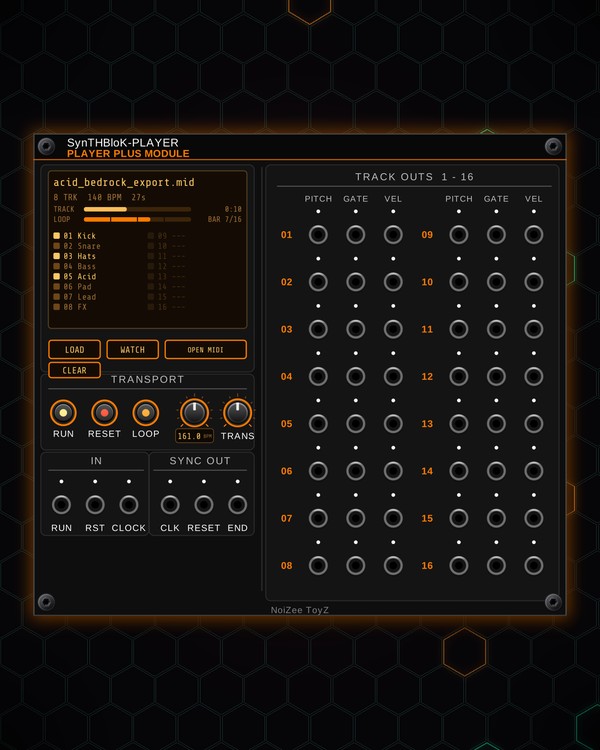
Player Plus plays standard MIDI files in your rack. Each track of the file (or each MIDI channel, for a single-track file) gets its own PITCH, GATE and VEL jacks, up to sixteen tracks, so a whole song can play your voices and drums. You can load several files at once and choose which track outs each one lands on.
It plays at the file's tempo or follows your clock, loops, transposes, and sends a clock, a reset and an end-of-song pulse for the rest of the rack. Snap the MIDI + Expansion to its right to see the notes scroll by as a piano roll, and to mute tracks and set a loop.
Quick start
- Drag a .mid file onto the module, or click LOAD (or OPEN MIDI) and pick one. The screen shows the file name, the number of tracks, the tempo and the length, then the track names.
- Patch a track's PITCH and GATE (under TRACK OUTS 1 - 16) to a voice's V/OCT and gate inputs, and VEL to a VCA or accent if you like. For drums, patch GATE to the drum's trigger input.
- Press RUN. The song plays at the file's tempo; turn the tempo knob to change it.
- LOOP is on by default, so the song starts over at its end. Press it off to stop at the end instead.
- Add the MIDI + Expansion right next to the Player to watch the notes, and click its track chips to mute parts.
Controls
Loading files
- LOAD / OPEN MIDI: pick a MIDI file; it replaces what is loaded. Clicking the top of the screen does the same.
- Drag files onto the module: the first replaces what is loaded, the rest go on the next free track outs.
- Track rows on the screen: click an empty or used row to load a file starting on that track out (files it would overlap are dropped). Right-click a row to remove the file on it.
- CLEAR: unloads everything.
- WATCH: pick a folder, and Player Plus loads the newest MIDI file in it whenever one is saved or changed (it waits until the file has finished writing). The button stays lit while watching; click again to stop. Handy with a DAW or an app that exports MIDI.
Transport
- RUN: play / stop. A trigger at the RUN jack (under IN) toggles it.
- RESET: back to the start. A trigger at RST does the same.
- LOOP: on = the song (or the loop set on the MIDI + Expansion) repeats; off = it stops at the end.
- Tempo knob: the tempo (30-300 BPM). It jumps to the file's tempo when a file loads. The small screen under it shows the tempo playing.
- TRANS: transposes every track, ±24 semitones.
Clock
- CLOCK (under IN): patch a clock and Player Plus follows it. The tempo knob dims, the screen under it shows EXT, and the song locks to the pulses.
- CLK (under SYNC OUT): a clock from the song's position, 16ths by default.
- RESET (under SYNC OUT): a pulse each time the song or loop starts over. END: a pulse at the end of the song or loop.
Screen
- The file name, then tracks / tempo / length (or a message for a few seconds after loading).
- TRACK: how far through the whole song, with the time. LOOP: where you are in the current 4-bar phrase, with the bar number.
- Track list: a lamp per track lights while a note plays, red when the track is muted on the MIDI + Expansion.
Right-click menu
- Load MIDI file..., Choose watch folder..., Stop watching (while a folder is watched, with its name shown), Reload current file.
- Auto-play new files: start playing as soon as a new file loads (off by default).
- Clock in pulses and Clock out pulses: 1 (quarters), 2 (8ths), 4 (16ths), 8 (32nds) or 24 (MIDI clock) per beat.
MIDI + Expansion
- Snap it directly to the right of Player Plus. Not docked, it says so; with no file loaded, it asks for one.
- Piano roll (top screen): every track in its own colour, scrolling past a fixed playhead. Click it to zoom between 2, 4, 8 and 16 bars across. The track numbers pulse gently with their notes.
- Info screen: the file name, tempo, bars and length, and PLAY / STOP with the bar and time.
- LOOP strip: click to drop a loop there (the same length as last time), drag across the song to set one, right-click to clear it. Scroll the wheel over it to change the length a beat at a time; Shift + wheel slides the loop. Picking a loop turns LOOP on in the Player and jumps there.
- - / +: the loop one beat shorter / longer. FULL: loop the whole song.
- 1 BEAT to 32 BARS: one-tap loop lengths. Tap the lit one again to clear the loop.
- Track chips: click to mute a track (its gates and velocity go quiet), Shift-click to solo it (again to unsolo), right-click to hide it from the piano roll.
Jacks
Player Plus
Inputs
- Run toggle trigger
- Reset trigger
- Clock in tempo follows the pulses and the BPM knob is bypassed; set pulses per beat in the menu
Outputs
- Clock out pulses per beat set in the menu, 4 = 16ths
- Pulse when the song restarts
- Pulse at the end of the song
- Track N pitch 1 V/oct, C4 = 0 V
- Track N gate
- Track N velocity 0-10 V
N = 1, 2, 3 ... (one jack per track, channel or strip). Hover a jack in Rack for the same text.
Tips
- Each track plays one note at a time (the newest held note). For chords, split the notes over several tracks in your DAW.
- Patch CLK into Euclid's CLOCK and RESET (under SYNC OUT) into its RESET: its rhythms then play in time with the song and line up each time it starts over.
- Set a 1 or 2 bar loop on the MIDI + Expansion and mute tracks on the chips to jam on one section while you build a patch.
- Pairs well with POLY, QUAD and the free Kick and Snare/Hat: one track per voice. Add the MIDI + Expansion to see the notes scroll.