
← Back to the PATCH GEN card · All how-to pages
How to use
PATCH GEN
NoiZee ToyZ pack · coming soon to VCV
What it does
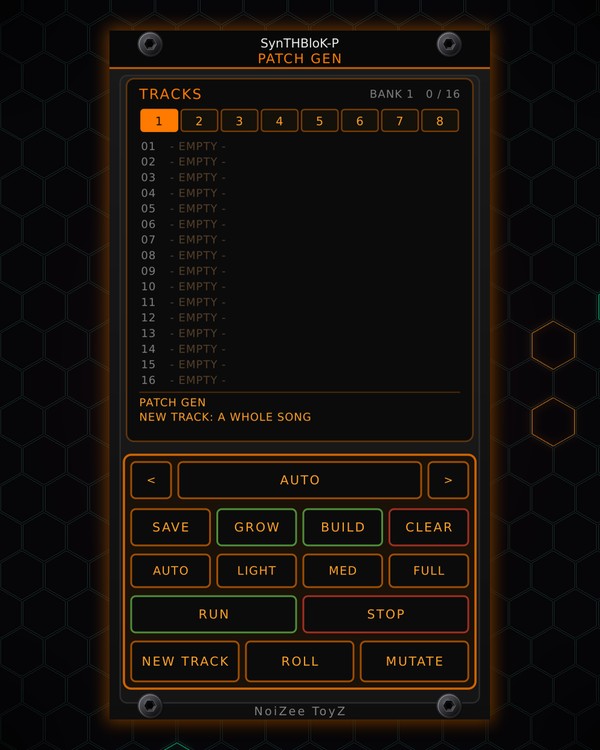
PATCH GEN is the liquidnick.com PATCH GEN inside Rack. Pick a genre and press NEW TRACK: it builds a whole musical patch out of the modules you have installed, free ones included, cables and all, and places it in your rack below what is already there.
With the NoiZee ToyZ pack installed, a new track is a whole song: MTX COMPOSER plays it through sections A-H, with parts coming in and out. It works like RANDROYD: ROLL and MUTATE rework the song, GROW adds effects, and you can save up to 8 banks of 16 tracks.
Quick start
- Pick a genre with < and > (or click the genre key to step through them). AUTO lets PATCH GEN choose.
- Pick a size: LIGHT, MED, FULL, or AUTO (it picks by how busy your CPU is).
- Press NEW TRACK. The screen says what it placed. Press RUN to start the song from the top.
- Not quite right? ROLL gives the same song new sounds; MUTATE makes variations on every part.
- Like it? Pick an empty spot in the track list and press SAVE.
Controls
Making a track
- < GENRE >: the genre for the next new track.
- AUTO, LIGHT, MED, FULL: how big the track is, and how many effects one GROW adds (LIGHT one, MED two, FULL three). AUTO picks by the CPU meter.
- NEW TRACK: a whole new song in the genre. It swaps out the last patch PATCH GEN placed (only modules it placed itself); Ctrl+Z takes it back.
- ROLL: new sounds for the playing song: the same notes, key, tempo and form.
- MUTATE: variations on every part, in place; the cables stay. Set how much in the right-click menu.
- GROW: cuts an effect from any installed brand into a sound's path to the mixer (reverb, delay, filter, drive, chorus, crush and more).
- RUN, STOP: start the song from the top, or stop it.
Saved tracks
- Screen: the track list, 16 spots per bank, with each track's name, genre and size. Click a bank number (1-8) to switch banks, click a track to pick it, double-click it to build it.
- SAVE: stores the playing patch (every module's settings, the cables and the song) in the picked spot, or the bank's next free one.
- BUILD: builds the picked track.
- CLEAR: takes PATCH GEN's patch out of the rack. Your saved tracks stay.
Right-click menu
- KEEP this patch: the patch stays, and the next NEW TRACK goes below it instead of replacing it.
- UNDO the last PATCH GEN change: the same as Ctrl+Z when PATCH GEN made the last change in the rack.
- MUTATE amount: 15 % to 100 %.
- Delete the picked track.
Tips
- CPU guard: when the rack's CPU meter reaches 85 %, NEW TRACK, ROLL, GROW and BUILD wait, and the effects GROW added are parked (bypassed) newest first until the rack calms down. They come back once it is under 70 % again. The bar under the screen shows the meter.
- It uses whatever you have installed, including the free modules on the NoiZee ToyZ page. Install more and the patches get more varied.
- Ctrl+Z works on every NEW TRACK, ROLL, GROW and BUILD: PATCH GEN follows Rack's own undo.