
← Back to the MTX Quad card · All how-to pages
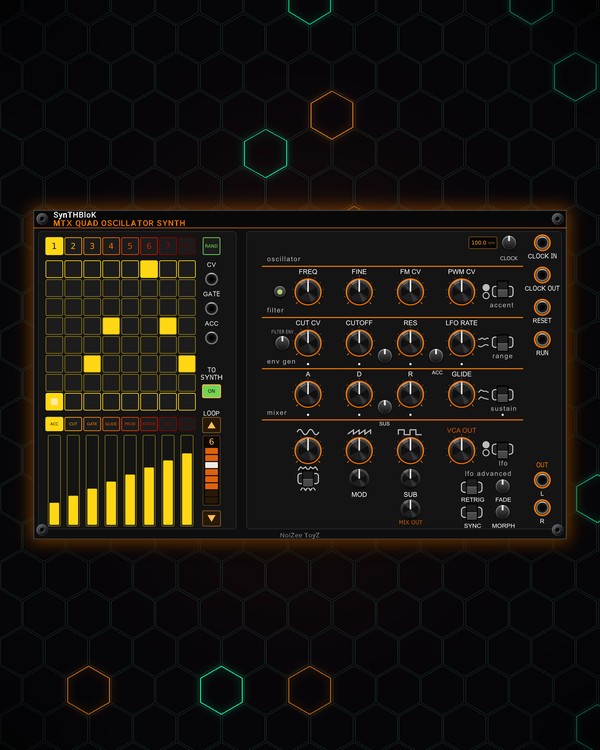
How to use
MTX Quad
NoiZee ToyZ pack · coming soon to VCV
What it does
MTX Quad is the QUAD synth voice with its own note sequencer. On the left, an 8x8 grid plays notes of a key and scale: each column is a step, each row a note, and several notes on one step play as a chord. Eight patterns of up to 16 steps.
Under the grid, eight sliders give every step its own accent, cutoff, gate length, glide, chance, ratchet, octave and resonance. On the right is the QUAD itself: stacked oscillators with triangle, saw (or blade), square and sub, a filter, an envelope, glide and an LFO, with a stereo out.
Quick start
- Patch OUT L and R (bottom right) to your mixer or audio out. Pattern 1 already has a short line.
- Set the tempo with the CLOCK knob (the screen beside it shows it), or patch a clock into CLOCK IN: one step per pulse.
- Pick a key and scale in the right-click menu, then click pads to write notes. Or press RAND for lines on all eight patterns.
- Click a slider bank (ACC, CUT, GATE ...) and drag the sliders to shape each step.
- Shape the sound with CUTOFF, RES and the envelope (A, D, R).
Controls
Grid and patterns
- Pads: each column is a step, each row a note of the scale (bottom row = the key's root, top row = its octave). Click to add or remove a note; up to four notes on a step make a chord. Right-click a pad to switch that step's accent on or off.
- 1-8 (over the grid): pick the pattern.
- RAND: new lines on all eight patterns (a chord progression, in key). The sliders stay as they are. Ctrl+Z takes it back.
- LOOP column: ▲ / ▼ step the pattern length (1-16), and the bar shows the looped steps and the playhead (click a cell to loop up to it). Over 8 steps, the grid shows steps 1-8 or 9-16, following the playhead.
- CV, GATE, ACC jacks: the grid's pitch (1 V/oct) and gate, one channel per chord note, and the accent (0-10 V while the gate is high). They work whether or not the QUAD plays.
- TO SYNTH (ON): lit = the grid plays the QUAD; off = it only sends CV, GATE and ACC.
Per-step sliders
Click a bank button, then drag (or click) a slider to set that step's value:
- ACC: accent.
- CUT: cutoff up or down from the knob (middle = no change).
- GATE: note length; full ties into the next step.
- GLIDE: slide into the note.
- PROB: the chance the step plays.
- RATCH: 1 to 4 hits on the step.
- OCT: -2 to +2 octaves (middle = none).
- RES: resonance up or down (middle = no change).
Clock and run
- CLOCK knob and screen: the internal clock. A clock at CLOCK IN takes over; CLOCK OUT sends the pulses on.
- RESET: back to step 1.
- RUN jack: a trigger starts from step 1 and the next one stops; or hold a gate high to run. Run on / off is also in the right-click menu.
The QUAD
- The green button at the left of the oscillator row: how many oscillators are stacked (1-4). The spread between them is in the right-click menu.
- FREQ, FINE: tuning.
- FM CV: how much the LFO wobbles the pitch. PWM CV: the square's pulse width (the LFO moves it too).
- CUTOFF, RES: the filter. The small knob between them is keytracking (higher notes open the filter more or less).
- FILTER ENV: how far the envelope opens the filter. CUT CV: an LFO wobble on the cutoff.
- ACC and the accent switch: how much accents open the sound, and accents on / off.
- A, D, SUS, R: the envelope; the sustain switch picks ADR or ADSR.
- GLIDE: slide between notes.
- Triangle, saw and square knobs: each wave's level; the switch under them picks saw or blade. SUB: a sub oscillator.
- VCA OUT, MIX OUT: output levels.
- LFO RATE, the range switch (slow / fast) and the lfo switch (on / off). lfo advanced: RETRIG, FADE (fade-in), SYNC (lock to the clock) and MORPH.
Right-click menu
Run, Key, Scale (twelve, from Minor and Major to Hirajoshi, Pelog and Bhairav), Grid octave (C2-C6), pattern length (up to 16 steps), Grid shows (follow the playhead, steps 1-8 or 9-16), Copy steps 1-8 to 9-16, Copy pattern to the next one, RAND genre (RANDROYD's chords), Clear this pattern, Clear every pattern, Chords in just intonation (pure chords, no beating), and the voice's filter drive and unison spread.
Jacks
Inputs
- Run a trigger starts from step 1 and the next stops; or a gate: high runs
Outputs
- Grid pitch 1V/oct, one channel per chord note
- Grid gate one channel per chord note
- Grid accent 0..10 V while the gate is high
N = 1, 2, 3 ... (one jack per track, channel or strip). Hover a jack in Rack for the same text.
Tips
- Drops into an MTX rig next to MTX-8 and MTX-DRUM; MTX Composer switches its patterns by song section.
- Turn TO SYNTH off and patch CV / GATE to another synth: the grid and its chords then play that one.
- Set RATCH on the last step or two and lower PROB on a few others for fills that change every time round.
- Set the length to 16 and use Copy steps 1-8 to 9-16, then change a few notes in the second half for a two-bar line.