
← Back to the MTX-FX card · All how-to pages
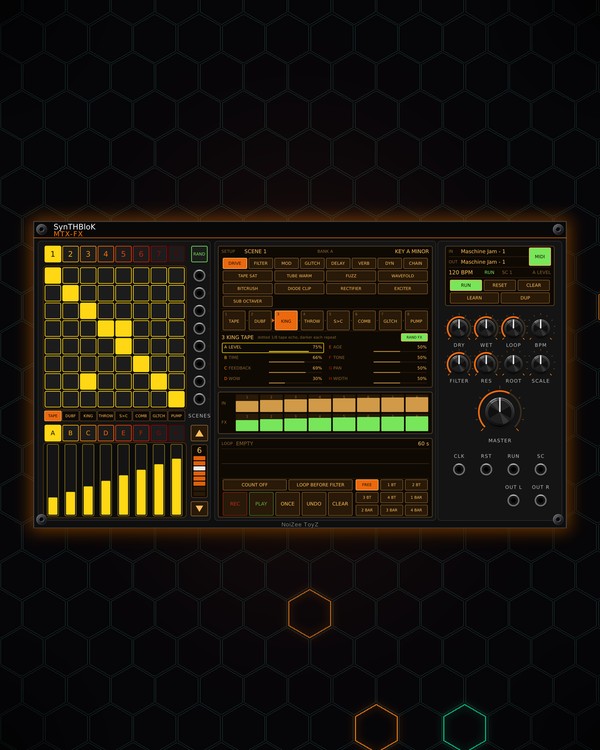
How to use
MTX-FX
NoiZee ToyZ pack · coming soon to VCV
What it does
MTX-FX is an effects desk for up to eight sounds. Each row of its 8x8 grid is an input, each column one of eight effect slots: light a pad and that input goes into that slot. The slots pick from 64 effects in seven tabs, and you can link a slot into the next to build chains, or load one of 12 ready-made chains in one click.
The eight patterns are eight routing scenes, so a pad press or a scene change re-routes the whole mix. After the effects come a DJ filter and a tape loop (the MTX-ECHO looper), then MASTER.
Quick start
- Patch up to eight sounds into the IN jacks beside the grid (top = input 1). A 2-channel cable comes in as stereo. Take OUT L / OUT R to your mixer.
- Click a pad to send that row's input into that column's slot. Right-click a pad for an accent (full level; a plain send is a little lower).
- Pick effects on the setup screen: click a tab (DRIVE, FILTER, MOD, GLITCH, DELAY, VERB, DYN), click a slot cell, then click an effect to load it there. Or drag the effect onto a slot cell, a slot name under the grid, or a pad.
- For an instant setup, press RAND FX (new effects on all eight slots, always with an echo and a reverb), or open the CHAIN tab and drag a chain onto a slot.
- Balance it with DRY, WET and MASTER, and sweep FILTER.
Controls
Grid and scenes
- Pads: click = send that input into that slot on / off; right-click = accent.
- 1-8 (over the grid): the routing scene. Each scene has its own sends and accents.
- RAND (over the IN jacks): random routing on all 8 scenes (a theme and variations) and safe settings for every slot, in a new key.
- SCENES column (▲ / ▼ and its display): how many scenes play in turn, one per bar, while running. 1 = hold the scene.
- CLEAR: clears this scene's sends. DUP: copies this scene into the next one.
The effects (SETUP screen)
- DRIVE: TAPE SAT, TUBE WARM, FUZZ, WAVEFOLD, BITCRUSH, DIODE CLIP, RECTIFIER, EXCITER, SUB OCTAVER.
- FILTER: DUB FILTER, LADDER LP, FORMANT, COMB RES, STEINER, AUTO WAH, FILTER SWEEP, 3-BAND EQ.
- MOD: CHORUS, PHASER, RING MOD, TREMOLO, ROBOT, FLANGER, FM VIBRATO, AUTO PAN, HAAS WIDE, STEREO IMAGER.
- GLITCH: GLITCH, STUTTER, TAPE STOP, REVERSE, SHUFFLE, RETRIGGER GATE, CD SKIP, DATA CORRUPT, SR DROPOUT, MICRO FREEZE, PITCH ARP.
- DELAY: KING TAPE, DUB THROW, PING PONG, SLAPBACK, WARP DELAY, TECHNO TIGHT, JUNGLE SHORT, MICRO DELAY, SPACE ECHO.
- VERB: SPRING>CORR, DUB SPRING, CORRIDOR 800M, PLATE, SHIMMER, ROOM, GRAND HALL, REVERSE PLATE, GATED VERB.
- DYN: PUMP, SIDECHAIN, GLUE COMP, LIMITER, PARALLEL SMASH, TAPE COMP, TRANSIENT, NOISE GATE.
- CHAIN: BASS DUB, DUB BUS TAPE, DUB VOID, ACID STANDARD, KICK IRON, MASTER BUS, JUNGLE ACID, SNARE CRACK, WUB BUS, GLITCH DRUMS, GLITCH BASS, DUB SET. A chain fills the slots from the one you drop it on, already linked.
Slots
- Slot cells: click to select a slot. Drag one onto another to swap them. Right-click: pick its effect by tab, Start a chain here, Link into the next slot, Reset its settings, Clear its sends in this scene.
- Click the gap between two slot cells to link them: the first slot feeds the next. Delays and reverbs fed by a link pass it on and add their repeats.
- Slot names under the grid: click to select that slot, or drop an effect on one.
- The eight setting rows under the slots (the selected slot): LEVEL, its four own settings (named for the effect), TONE, PAN and WIDTH. Drag sideways or scroll to change one; right-click puts it back to its default.
- RAND FX: new effects on all 8 slots, linked into musical chains, always an echo and a reverb, safe settings. The scenes are kept.
Strips
- A-H (under the slot names): the strip bank: A = level, B-E = the effect's four settings, F = tone, G = pan, H = width.
- Strips: one per slot. Click or drag to set that slot's value in the bank you are on.
- The meter screen under SETUP shows each input's level and each slot's return.
Master section
- DRY: every input straight through. WET: all the effect returns. LOOP: the tape loop's level. MASTER: the output level.
- FILTER: the DJ filter: left = low-pass, centre = off, right = high-pass. RES: its resonance.
- BPM: the tempo for the clocked effects while CLK is unpatched (60-180).
- ROOT / SCALE: the key for COMB RES, RING MOD and ROBOT: Minor, Dorian, Phrygian or Major.
- RUN: runs the clocked effects and the scene loop. RESET: back to the start of the bar.
- The screen shows the tempo, RUN or STOP, the scene and the strip bank.
Tape loop
- REC: record; on a loop it replaces it from the top. PLAY: play / stop. ONCE: play it once. UNDO / REDO: the last replace. CLEAR: empty it.
- Record length cells: FREE, 1 BT-4 BT or 1 BAR-4 BAR. COUNT-IN: OFF or 1-4 beats.
- LOOP BEFORE FILTER: lit = the loop sits before the DJ filter, so the filter sweeps the loop too.
- The waveform: scroll to zoom, right-click to see all of it. The loop audio is kept with the patch.
Jacks
- CLK: 16th notes (the BPM knob when unpatched). RST: a trigger resets. RUN: a trigger toggles RUN.
- SC: the SIDECHAIN effect ducks to this instead of the beat.
Controller and menu
- MIDI (on the master screen): on = it listens to the controller. Click the screen's MIDI IN / MIDI OUT to pick the ports. Click the module to give it the controller.
- LEARN: arm it, then press the top-left pad on the JAM so MTX-FX knows which pad page it is on.
- On a Maschine JAM: the pads are the grid; hold GRID and press a pad for an accent; hold MUTE or SOLO and press a pad to mute or solo that input.
- Right-click menu: Controller (Auto, Maschine JAM, or APC mini mk2, Launchpad Mini MK3, Launchpad X, Launchpad Pro MK3 in beta), Scene loop, JAM matrix page, Strip bank, Clear every scene, Unlink every slot, Clear mutes and solos.
Jacks
Inputs
- Input N mono, or stereo on a 2-channel cable
- Clock 16th notes; internal BPM when unpatched
- Reset trigger
- Run trigger: toggles RUN
- Sidechain the SIDECHAIN effect ducks to it instead of the beat
Outputs
- Left
- Right
N = 1, 2, 3 ... (one jack per track, channel or strip). Hover a jack in Rack for the same text.
Tips
- The effects desk for an MTX rig: feed it MTX-DRUM, MTX-DUO and MTX-8 and play the effects from the grid or JAM.
- In an MTX Composer, each section can pick an MTX-FX scene, so the routing changes with the song.
- For a dub throw, send the snare into a DELAY slot in one scene only, then switch to that scene for a bar.
- Patch the kick into SC and use SIDECHAIN on the pads and reverbs, so they pump with the kick.