
← Back to the MTX-ECHO card · All how-to pages
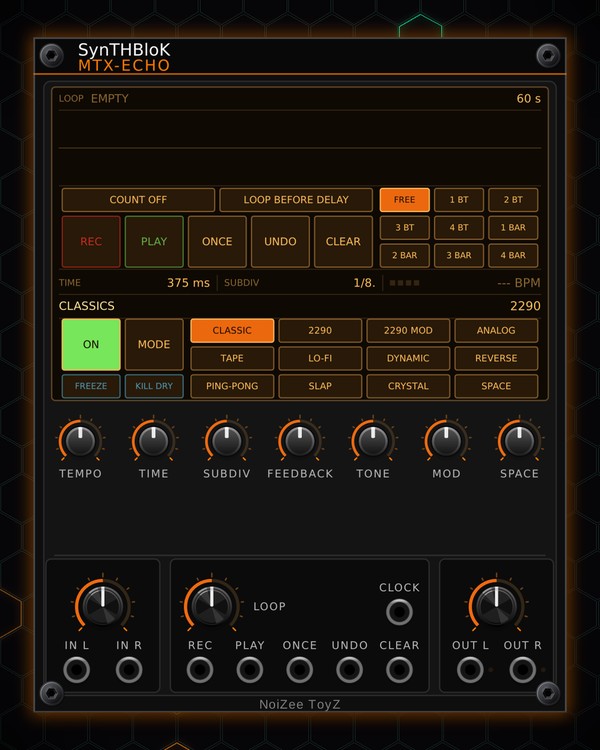
How to use
MTX-ECHO
NoiZee ToyZ pack · coming soon to VCV
What it does
MTX-ECHO is a stereo delay with twelve characters, from the MTX ping-pong and clean digital to analog, tape, lo-fi, reverse, octave shimmer and a multi-head space echo. Clock it and the repeats lock to your tempo in any of eleven note values, including three dual-tap rhythms. Freeze, kill dry, a reverb on the repeats and banks of presets are all on the screen.
Below the delay sits a 60-second stereo looper: record, replace, play, play once, undo and clear, locked to the beat whenever there is a tempo.
Quick start
- Patch your sound into IN L (and IN R for stereo). Take OUT L / OUT R to your mixer.
- Patch a 16th-note clock into CLOCK (for example CLK OUT of MTX-1), or set TEMPO to your tempo.
- Pick a note value with SUBDIV (1/8. is a classic dotted eighth) and a character in the type grid on the screen (CLASSIC, TAPE, SPACE ...).
- Raise FEEDBACK for more repeats and turn up the mix knob over IN L / IN R.
- Or click MODE to page to a preset bank (DRUMS, SYNTH, DUB ...) and click a preset.
- To loop: press REC, play a phrase, press PLAY. It loops in time.
Controls
Delay
- Type grid (on the screen, MODE on CLASSICS): CLASSIC (the MTX ping-pong), 2290 (clean digital), 2290 MOD (chorused), ANALOG, TAPE (wow and flutter), LO-FI (crushed), DYNAMIC (ducks while you play), REVERSE, PING-PONG, SLAP, CRYSTAL (octave shimmer) and SPACE (multi-head space echo).
- SUBDIV: the note value with a clock or TEMPO: 1/2, 1/4., 1/4, 1/4T, 1/8., 1/8, 1/8T, 1/16, and the dual taps 1/4+1/8., 1/4+1/8T and 1/8.+1/16. You can also click (or right-click, or scroll) SUBDIV on the screen.
- TEMPO: the tempo when CLOCK is unpatched (40-240 BPM). At the bottom it reads FREE and the TIME knob sets the delay instead.
- TIME: the delay time when free. On SLAP it sets the slap, 20-300 ms.
- FEEDBACK: how many repeats. TONE: dark to bright. MOD: modulation. SPACE: reverb on the repeats.
- Mix knob (over IN L / IN R): the wet level. The dry always stays at full.
- ON: lit = delay on; off = bypass. FREEZE: holds the repeats. KILL DRY: only the repeats come out.
Presets
- MODE: click to page CLASSICS > USER > DRUMS > SYNTH > CINEMATIC > DUB > LO-FI > RHYTHM; scroll to go both ways. The line above the cells shows the page and the loaded preset.
- Factory banks: eight presets each, named on the cells (HOUSE, TECHNO, DUB, AMBIENT, SKANK, CASSETTE, DOTTED ...). Click one to load it.
- USER: eleven slots. Light STORE, then click a slot to save the delay settings into it.
Looper
- REC: record a new take; on a playing loop it replaces it from the top of the loop. PLAY: play / stop. ONCE: play it once. UNDO / REDO: the last replace. CLEAR: empty the loop.
- Record length cells: FREE (until you press again), 1 BT-4 BT or 1 BAR-4 BAR: the take closes by itself at that length.
- COUNT-IN: OFF (the take starts on the next beat) or 1-4 beats first.
- LOOP BEFORE DELAY: lit = the loop runs into the delay, so the loop gets echoed.
- LOOP knob: the loop's level. The screen shows the loop state, its length and a waveform with the playhead (scroll to zoom, right-click to see all of it).
- Jacks REC, PLAY, ONCE, UNDO, CLEAR: a trigger presses the button.
Output and menu
- Knob over OUT L / OUT R: the master output level.
- Right-click menu: Clock pulse length (1/16 for MTX steps, 1/8 or 1/4 beats) and Trails on bypass (repeats ring out when you switch the delay off). The loop audio is not saved with the patch.
Jacks
Inputs
- Left / mono
- Right normalled to left
- Clock sets the time with SUBDIV
- Loop record / replace trigger
- Loop play / stop trigger
- Loop play once trigger
- Loop undo / redo trigger
- Loop clear trigger
Outputs
- Left
- Right
N = 1, 2, 3 ... (one jack per track, channel or strip). Hover a jack in Rack for the same text.
Tips
- Delay for any MTX voice; it shares its looper with MTX-LOOP and MTX-FX.
- In an MTX Composer, each scene can call up one of the first eight presets of the bank you are on, so the echo changes with the song.
- The DRUMS bank keeps the repeats short, dark and tucked under the hits: a safe start on a drum bus.
- Click FREEZE at the end of a phrase for a held wash, and click it again on the downbeat.