
← Back to the MTX-DUO card · All how-to pages
How to use
MTX-DUO
NoiZee ToyZ pack · coming soon to VCV
What it does
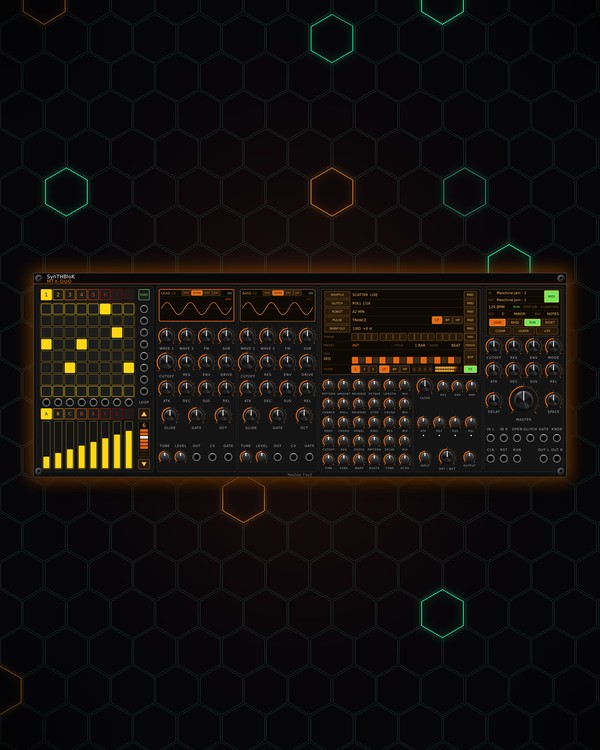
MTX-DUO is two mono synths in one panel, LEAD and BASS. Each has two morphing oscillators (saw to square to sine) with hard sync, FM and a sub, a filter with its own envelope, an ADSR, drive and glide.
An 8-step note grid plays both in a key and scale, with eight patterns: each row is a note of the scale, so whatever you click is in tune, and several notes on one step make a chord. The two synths go through a master filter, delay and reverb, then the FORGE FX chain (SHUFFLE, GLITCH, ROBOT, PULSE, WARP DLY) to the stereo out. Each synth also has its own audio, pitch and gate out.
Quick start
- Patch OUT L and OUT R (bottom right) to your mixer or audio out. Pattern 1 already has a lead riff and a bass line.
- Make sure RUN is lit (green). With nothing in CLK, DUO plays at its own tempo (120 BPM; set it in the right-click menu).
- Pick a KEY and SCALE on the master screen (click or scroll them).
- Click LEAD or BASS to show that synth on the grid, then click pads to write notes. Or press RAND for lines on all eight patterns.
- Shape the sound with each synth's CUTOFF, ENV and WAVE 1 knobs, and switch on FORGE FX stages on the middle screen.
Controls
Grid and patterns
- Pads: each column is a step, each row a note of the scale (bottom row = the key's root, top row = its octave). Click to add or remove a note; several on one step play as a chord (up to four notes). Right-click a pad to accent that step (louder).
- LEAD / BASS (master screen): which synth the grid shows. Clicking a synth's screen picks it too.
- 1-8 (over the grid): pick the pattern.
- RAND: new LEAD and BASS lines on all eight patterns (a chord progression, in key, accents on the beats) and new strip values. Ctrl+Z takes it back.
- CLEAR: clears the shown synth's notes in this pattern.
- LOOP column: ▲ / ▼ step the pattern length (1-8); click a cell to loop up to it.
- RUN and RESET: start / stop and back to step 1. A trigger at the RUN or RST jack does the same.
LEAD and BASS
- Screen: the synth's sound. Its top line: SYNC switches hard sync, SCOPE / SPEC / ENV pick the view (in ENV, drag the corners to set the envelope), and clicking the synth's name mutes it.
- WAVE 1, WAVE 2: each oscillator's wave, saw to square to sine.
- FM: oscillator 1 modulates oscillator 2. TUNE: oscillator 2's tuning (fine detune in the middle, up to ±12 semitones at the ends).
- SUB: a sine an octave down.
- CUTOFF, RES, ENV: the synth's filter and how far its envelope sweeps it.
- DRIVE: saturation. LEVEL: the synth's volume.
- ATK, DEC, SUS, REL: the synth's envelope.
- GLIDE: slide between notes. GATE: note length; full ties each note into the next, with glide.
- OCT: -2 to +2 octaves.
- OUT, CV, GATE jacks: the synth on its own: audio, pitch (1 V/oct) and gate.
Master
- KEY | SCALE | ENV (master screen): click to step forward, right-click back, or scroll. Twelve scales from Minor and Major to Hirajoshi, Pelog and Bhairav. ENV picks what fires the master filter's envelope: any note, LEAD notes, BASS notes, every beat or every step.
- CUTOFF, RES, ENV, MODE: the master filter on both synths; MODE morphs low-pass to band-pass to high-pass.
- ATK, DEC, SUS, REL: the master filter's envelope.
- DELAY (a ping-pong dotted eighth) and SPACE (reverb), before FORGE FX.
- MASTER: the volume at OUT L / R.
FORGE FX
On the middle screen, click a stage's name to switch it on, and click or scroll its value to step it (right-click steps back). Each stage's RND picks new musical settings every cycle. The small knobs below set each stage by hand. FX (green) switches the whole chain; off = OUT L / R dry.
- SHUFFLE: moves, reverses and octave-shifts slices of the beat.
- GLITCH: random rolls, reverses, tape-stops and crush. A trigger at GLITCH fires one now.
- ROBOT: a robot vocoder tuned to a root and chord.
- PULSE: a rhythmic gate and filter sweep. A gate at OPEN lets everything through while high.
- WARP DLY: a clocked delay whose repeats shift in pitch and can run back through ROBOT and PULSE.
- THROW: the 16 cells send just those steps into the delay.
- PRESET (right-click for the list), CYCLE, GLIDE, FREEZE: ready-made chains, and how often and how smoothly RND moves.
- TRIG, FILTER and its envelope, INPUT, DRY / WET, OUTPUT: the FX chain's own filter, its trigger (a gate at GATE fires it when TRIG is GATE) and levels.
Strips and controller
- A-H and the strips: A and B move LEAD's knobs (oscillator, then filter and envelope), C and D the same on BASS, E the mix (level, cutoff, resonance and drive of each). F, G and H are free strips that only send CV. Every strip's voltage comes out of the jack above it; ±5V switches the range.
- Patch anything into IN L / IN R to add it to the synths before FORGE FX.
- MIDI IN / MIDI OUT (master screen): click a line to pick the port. MIDI: green = DUO listens to the JAM.
- LEARN: arm it, then press the JAM's top-left pad.
- Right-click menu: Controller (Auto, Maschine JAM, or APC mini mk2, Launchpad Mini MK3, Launchpad X, Launchpad Pro MK3 in beta), Copy pattern to the next one, Clear every pattern, RAND genre (RANDROYD's chords), pattern length, the tempo, the LEAD / BASS mix, master filter settings, JAM page, strip bank and light colours.
- On a Maschine JAM: the pads are the grid and the scene buttons the patterns. MUTE / SOLO mute or solo the shown synth, hold CLEAR for a second to clear every pattern, DUPLICATE copies the pattern to the next one, and PLAY starts and stops DUO (or the song when an MTX Composer is in the patch). The JAM knob sets MASTER (MST / CUE), LEAD level (GRP) or BASS level (IN1).
Jacks
Inputs
- Clock 16th notes; the BPM knob runs it when unpatched
- Reset trigger: same as pressing RESET
- Run trigger: toggles RUN, like pressing it
- Left added to LEAD + BASS before FORGE FX
- Right left is copied here when unpatched
- Open (gate) FORGE FX PULSE lets everything through while high
- FORGE FX glitch now trigger
- FORGE FX filter env gate fires its ADSR when its TRIG is GATE
Outputs
- Left LEAD + BASS through MASTER
- Right LEAD + BASS through MASTER
- Lead audio
- Bass audio
- Lead pitch 1 V/oct, 0 V = C4
- Lead gate
- Bass pitch 1 V/oct, 0 V = C4
- Bass gate
- Strip N CV the shown bank
- Knob CV 0..10 V: the JAM knob's page
- Row N trigger LEAD or BASS plays this row's note
N = 1, 2, 3 ... (one jack per track, channel or strip). Hover a jack in Rack for the same text.
Tips
- Lead and bass for MTX-8 or MTX FORGE grooves: patch DUO's OUT L / OUT R into FORGE's IN L / IN R to share its FX, or run it alongside. It follows MTX Composer sections and pairs with GRIT for weight.
- Set a synth's GATE to full and add GLIDE for acid-style slides between tied notes.
- Patch CV and GATE to another synth voice to double the lead or bass with a different sound.
- Patch the row trigger jacks (beside the grid) to drums: a row fires whenever LEAD or BASS plays that note.