
← Back to the MTX-DRUM card · All how-to pages
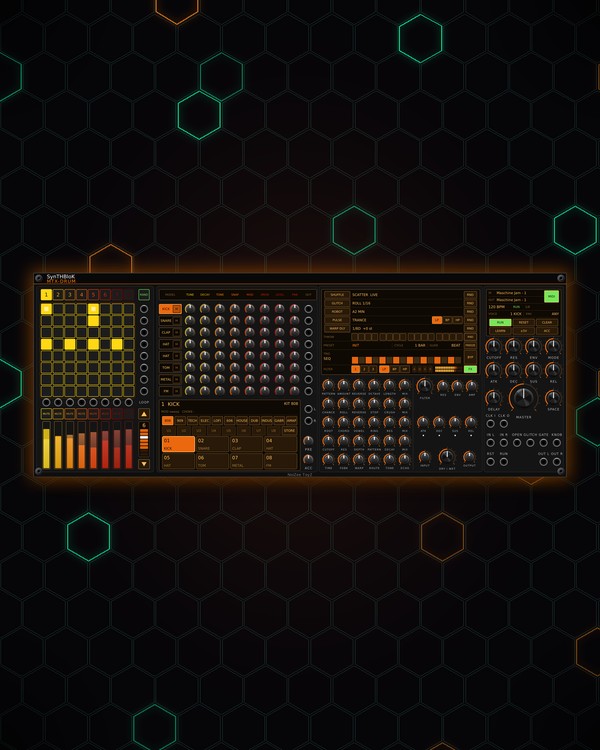
How to use
MTX-DRUM
NoiZee ToyZ pack · coming soon to VCV
What it does
MTX-DRUM is a drum-synth groovebox. Eight drum voices, one per grid row, each pick a model (KICK, SNARE, CLAP, TOM, HAT, METAL, FM, NOISE, LOG or GABBER) and have eight knobs of their own. The 8x8 grid plays them with hits and accents, in eight patterns, and factory kits from 808 and 909 to gabber and amapiano load a whole set at once.
Every voice has its own audio and trigger out, and choke groups let one hit cut another off (an open hat by a closed one). The mix goes through a final filter, delay and reverb, then the FORGE FX chain (SHUFFLE, GLITCH, ROBOT, PULSE, WARP DLY) to the stereo out.
Quick start
- Patch OUT L and OUT R (bottom right) to your mixer or audio out. Pattern 1 already has a beat.
- Make sure RUN is lit (green). With nothing in CLK I, DRUM plays at its own tempo: click or scroll the BPM on the master screen.
- Click a kit on the voice screen (808, 909, TECH ...) to load a set of drums.
- Click pads to set steps, or press RAND for eight new grooves built from each row's drum.
- Turn a row's TUNE and DECAY knobs to shape that drum while it plays.
Controls
Grid and patterns
- Pads: click to set or clear a hit. Right-click to switch a hit to an accent and back. With ACC lit, a click places an accent straight away. Dim pads are ghost notes (quiet hits RAND can write).
- 1-8 (over the grid): pick the pattern.
- RAND: eight new grooves (house / techno, breakbeat, electro and broken styles), each row's part written for its model. Ctrl+Z takes it back.
- CLEAR: empties the current pattern. Clear every pattern is in the right-click menu.
- LOOP column: ▲ / ▼ step the pattern length (1-8); click a cell to loop up to it.
- RUN and RESET: start / stop and back to step 1. A trigger at the RUN or RST jack does the same.
Drum voices (one row each)
- MODEL cell: the row's drum. Scroll it to change the model; click it to select that voice; right-click for the model list, mute, solo and choke group. The small square on it mutes the row.
- TUNE, DECAY, TONE, SNAP: pitch, length, brightness and attack click.
- MOD: the model's own extra (a sweep, pitch drop, spread, ring, partials or FM amount).
- DRIVE, LEVEL, PAN: saturation, volume and place in the stereo field.
- OUT (end of each row): that drum on its own. The jacks beside the grid send a trigger for each row (louder on accents).
- ACC: accent depth: higher = plain hits play quieter, so accents stand out.
- PRE L / PRE R and PRE: the drum mix before the final filter, delay, reverb and FX, with its own level.
Voice screen and kits
- The selected voice's name and model; its 8 pads play each row and flash on its hits.
- Kits: click a factory kit (808, 909, TECH, ELEC, LOFI, 606, HOUSE, DUB, INDUS, GABR, AMAP) to load models, knobs and choke groups for all eight rows.
- STORE, then a user kit U1-U8, saves your rows there. Right-click a user kit to store into it or clear it.
- With the hit graph switched on (right-click menu), the screen also draws the last hit as WAVE, LINE, ENV, SPEC or SGRAM, with zoom.
Levels and mutes
- Strips: each strip is a voice's LEVEL, with its meter. Its voltage also comes out of the jack above it (±5V switches the range).
- Mute squares (above the strips): mute or unmute each voice.
Final stage
- BPM | VOICE | ENV (master screen): click to step forward, right-click back, or scroll. BPM only while CLK I is unpatched. ENV picks what fires the final filter's envelope: ANY hit, ROW 1, ACCENT, BEAT, STEP or the GATE jack.
- CUTOFF, RES, ENV, MODE: the final filter on the whole kit; MODE morphs low-pass to band-pass to high-pass.
- ATK, DEC, SUS, REL: its envelope.
- DELAY (a ping-pong dotted eighth) and SPACE (reverb).
- MASTER: the volume at OUT L / R.
- CLK O: a pulse on every step while it runs.
FORGE FX
On the middle screen, click a stage's name to switch it on, and click or scroll its value to step it (right-click steps back). Each stage's RND picks new musical settings every cycle. The small knobs below set each stage by hand. FX (green) switches the whole chain; off = OUT L / R dry.
- SHUFFLE: moves, reverses and octave-shifts slices of the beat.
- GLITCH: random rolls, reverses, tape-stops and crush. A trigger at GLITCH fires one now.
- ROBOT: a robot vocoder tuned to a root and chord.
- PULSE: a rhythmic gate and filter sweep. A gate at OPEN lets everything through while high.
- WARP DLY: a clocked delay whose repeats shift in pitch and can run back through ROBOT and PULSE.
- THROW: the 16 cells send just those steps into the delay.
- PRESET (try DRUM BUS; right-click for the list), CYCLE, GLIDE, FREEZE, and the FX chain's own FILTER, INPUT, DRY / WET and OUTPUT.
Controller and menu
- MIDI IN / MIDI OUT (master screen): click a line to pick the port. MIDI: green = DRUM listens to the JAM. LEARN: arm it, then press the JAM's top-left pad.
- Right-click menu: Controller (Auto, Maschine JAM, or APC mini mk2, Launchpad Mini MK3, Launchpad X, Launchpad Pro MK3 in beta), pattern length, JAM page, the tempo, Clear every pattern, Patched voice outs leave OUT L / R, Clock x2 (32nd notes for fast hats and snare rolls), the hit graph, Choke groups and the JAM light colours.
- On a Maschine JAM: hold GRID and press a pad for an accent; the group buttons mute voices and the strips set their levels; SONG switches FORGE FX; hold CLEAR for a second to clear every pattern; PLAY starts and stops DRUM (or the song when an MTX Composer is in the patch). The JAM knob sets MASTER (MST / CUE), DELAY (GRP) or SPACE (IN1).
Jacks
Inputs
- Clock 16th notes; the BPM runs it when unpatched
- Reset trigger: same as pressing RESET
- Run trigger: toggles RUN, like pressing it
- Left added to the drums before FORGE FX
- Right left is copied here when unpatched
- Open (gate) FORGE FX PULSE lets everything through while high
- FORGE FX glitch now trigger
- Gate FORGE FX filter env, and the FINAL filter env when its trigger is GATE
Outputs
- Left the drums through MASTER
- Right the drums through MASTER
- Row N trigger hit 6 V, accent 10 V
- Row N audio
- Strip N CV (voice
- Knob CV 0..10 V: the JAM knob's page
- Clock a 10 V, 5 ms pulse per 1/16 step while running
- PRE left the voice mix before the FINAL filter, DELAY, SPACE, FORGE FX and MASTER
- PRE right the voice mix before the FINAL filter, DELAY, SPACE, FORGE FX and MASTER
N = 1, 2, 3 ... (one jack per track, channel or strip). Hover a jack in Rack for the same text.
Tips
- Beats for MTX-8 and MTX-DUO: route DRUM through GLITCH-ECHO for fills and let CLOKWORX add rolls.
- Put the closed and open hat rows in the same choke group, so a closed hat cuts the open one off.
- Patch a voice OUT to its own effect; with Patched voice outs leave OUT L / R on, that drum leaves the main mix so it isn't doubled.
- Load GABR or AMAP and press RAND for gabber kicks or amapiano log drums in a few clicks.