
← Back to the MTX Composer card · All how-to pages
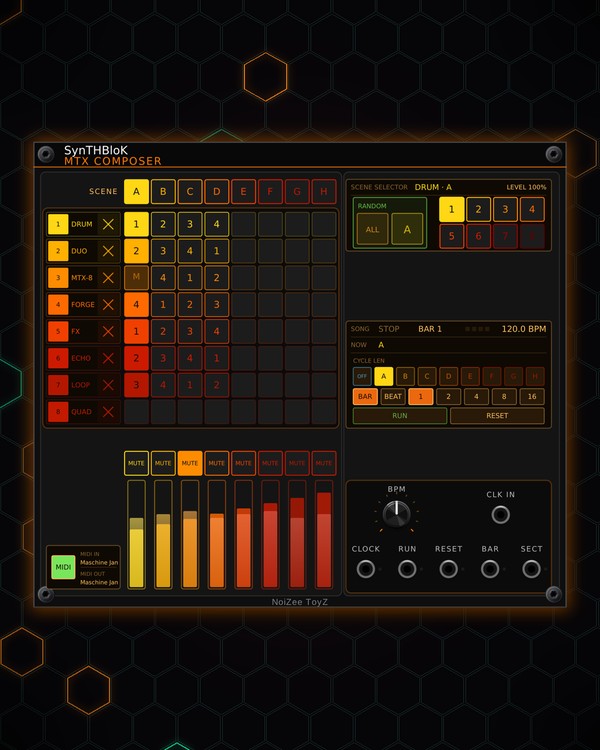
How to use
MTX Composer
NoiZee ToyZ pack · coming soon to VCV
What it does
MTX Composer turns the MTX modules in your patch into a song. It finds them by itself, with no cables, and gives each one a row of an 8x8 grid. The columns are eight scenes, A to H: each pad says which pattern that module plays in that scene, whether it is muted, and its level.
Launch a scene and every module switches on the next bar (or beat). Set a cycle and the song steps through its scenes by itself every 1 to 16 bars, with a four-count warning on the screen before each change. It is also the master clock, with CLOCK, RUN, RESET, BAR and SECT outputs.
Quick start
- Add MTX Composer to a patch with MTX modules in it (MTX-8, MTX-DRUM, MTX-DUO and so on). They show up on the rows by themselves.
- Click a pad, then click a pattern square (1-8) under SCENE SELECTOR on the right. Or scroll over a pad to step its pattern. Or press RANDOM ALL for random patterns in every scene.
- Press RUN. With nothing in CLK IN, it plays at the BPM knob's tempo.
- Click a scene letter (A-H) over the grid: the whole rig changes on the next bar.
- For a song that plays itself, pick a CYCLE LEN (for example D: A, B, C, D, then A again) and the bars each scene plays (1, 2, 4, 8 or 16).
Controls
The grid
- A-H (over the grid, under SCENE): click to launch that scene on the next bar or beat (at once while stopped). Click again before it lands to call it off. Right-click just selects it. The playing scene is filled; a waiting one blinks.
- Row names: the module on each row, with the pattern it plays now. Drag a name onto another row to swap the two rows. Click it (or right-click) for a menu to pick which module the row conducts, or to empty the row. The × at the end disconnects the module, and it stays off until you choose it again.
- Pads: click to select a pad. Scroll over it to step its pattern (below 1 = keep whatever the module is playing). Right-click to mute that module in that scene (M). Delete or Backspace over a pad clears it.
SCENE SELECTOR
- The screen shows the selected pad: the module, the scene, its level and whether it is muted.
- 1-8 squares: the pattern the selected pad plays.
- RANDOM: ALL gives every module a random pattern in every scene. The lettered square does it in one scene: the playing one while running, the selected one while stopped.
Mutes and levels
- MUTE (over each strip): mutes that row's module live. The patterns and pads stay as they are.
- Level strips: click or drag to set the row's level. The level is saved with the playing scene, so each scene can have its own mix. Double-click for full level. The strip also shows the module's output as a meter.
SONG
- The screen: RUN or STOP, the bar (BAR 2/4 in a cycle), the tempo, four beat squares, the scene playing (NOW) and the one waiting. In the last bar before a change it counts down (for example "B IN 3").
- CYCLE LEN: A = no cycle (a scene plays until you launch another); B-H = RUN plays from A up to that scene and starts again. OFF turns the cycle off but keeps the setting.
- BAR / BEAT: launches land on the next bar or the next beat.
- 1, 2, 4, 8, 16: bars each scene plays in the cycle.
- RUN: starts the song from the top, or stops it. RESET: back to the top.
- BPM: the tempo while CLK IN is unpatched (it locks while a clock is patched).
Jacks
- CLK IN: a 16th-note clock to follow (or another Composer's SECT, see FOLLOW below).
- CLOCK: 16th notes while running. RUN: a gate while running. RESET: a trigger when the song starts or resets. BAR: a trigger on each downbeat. SECT: the scene as a voltage (A = 0 V up to H = 7 V).
Right-click menu
- Song cycle direction: Forward, Backward, Ping-pong, Random, Drunk walk, Shuffle, or Odd / even.
- Place free modules on empty rows (on by default), Empty every row, Disconnect every module and Reconnect disconnected modules.
- Clear every section, Clear the selected row (every section), Clear the selected section.
- Follow another COMPOSER: this Composer plays the scenes of the one patched into its CLK IN (patch that one's SECT out there). Its own transport is covered and reads SYNCED TO MAIN COMPOSER. That gives you eight more rows.
- Controller (Auto, Maschine JAM, or APC mini mk2, Launchpad Mini MK3, Launchpad X, Launchpad Pro MK3 in beta), JAM controls (a list of what each JAM button does) and JAM matrix page.
Controller
- MIDI (green, bottom left): on = it listens to the controller. Click MIDI IN / MIDI OUT beside it to pick the ports. Click the module to give it the controller.
- On a Maschine JAM: the pads are the grid (press to select; MUTE + pad mutes, CLEAR + pad clears), the scene buttons launch A-H, A-H mute the rows, the touch strips set the levels, PLAY = RUN, TEMPO = RESET, GRID = bar / beat, PREV / NEXT launch the scene before / after, DUPLICATE copies the scene to the next, and the knob sets the BPM.
Jacks
Inputs
- Clock 16th notes; the BPM knob when unpatched
Outputs
- Clock 16th notes, while running
- Run gate
- Reset trigger as the song starts or resets
- Bar trigger on each downbeat
- Section A = 0 V .. H = 7 V
N = 1, 2, 3 ... (one jack per track, channel or strip). Hover a jack in Rack for the same text.
Tips
- Turns MTX-8, MTX FORGE, MTX-DUO, MTX-DRUM, MTX-FX, MTX-ECHO and MTX-LOOP patterns into a song; pair with MORPH for section changes. MTX Quad, GLITCH-ECHO, MORPH and SYMPHONICS take a row too.
- Run two Composers and each keeps its own modules: a module one Composer conducts shows IN USE on the other.
- Patch SECT into anything that takes CV, so a filter or effect changes with each scene.
- Set CYCLE LEN to H with Shuffle in the menu: every round plays all eight scenes once, in a new order.