
← Back to the MTX-8 card · All how-to pages
How to use
MTX-8
FREE · download it from its card
What it does
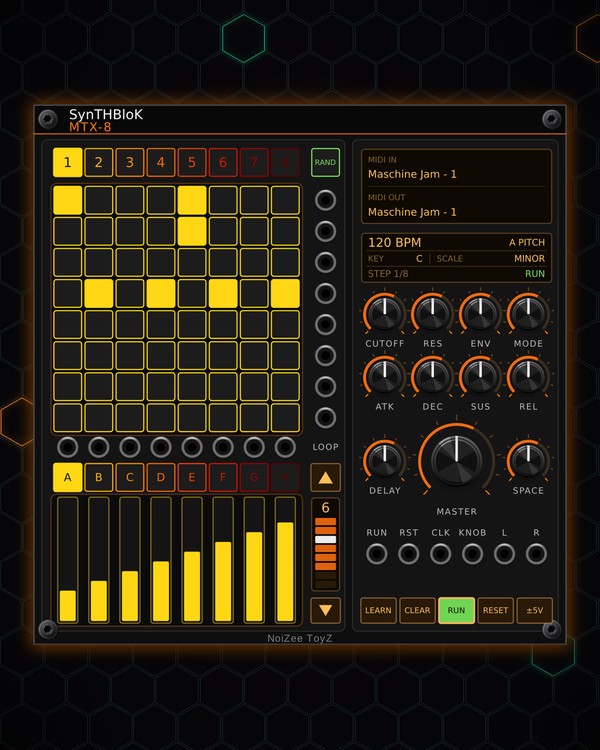
MTX-8 is a groovebox: an 8x8 pad grid plays eight built-in synth voices, one voice per row, with eight patterns of one to eight steps. Each voice has a morphing oscillator with a sub, a resonant filter, an envelope, drive and pan, and the mix goes through a dotted-eighth delay and a reverb to a stereo out.
Under the grid are eight touch strips in eight banks (A-H). Each bank is one sound setting (pitch, cutoff, resonance, decay, wave, level, pan, drive) and each strip is one voice, so you shape every voice live. KEY and SCALE keep the voices in tune, RAND writes grooves on all eight patterns, and its own tempo means it plays with nothing patched.
Quick start
- Patch L and R (bottom right) to your mixer or audio out.
- Press RAND (over the jacks beside the grid) for grooves on all eight patterns, in key. Or click pads to set steps: each row is a voice, each column a step.
- Make sure RUN is lit (green). With nothing in CLK, MTX-8 plays at its own tempo: scroll the BPM on the screen.
- Pick a KEY and SCALE on the same screen, then click 1-8 to switch patterns while it plays.
- Click a bank (A = pitch, B = cutoff ...) and drag the strips to change each voice.
Controls
Grid and patterns
- Pads: click to set or clear a step. Each row is a voice, top row = voice 1.
- 1-8 (the buttons over the grid): pick the pattern. Each pattern keeps its own steps.
- RAND: new grooves on all eight patterns (a theme and variations over a chord progression, in key) and new values on every strip bank. Ctrl+Z takes it back.
- CLEAR: empties the current pattern.
- LOOP column: ▲ / ▼ step the pattern length (1-8), and the bar shows the looped steps and the playhead (click a cell to loop up to it).
Tempo, key and scale
- Screen (under MIDI): the tempo and strip bank, KEY and SCALE, then the step and RUN / STOP. Scroll the BPM, KEY or SCALE, or click it (left click up, right click down). The BPM only changes while CLK is unpatched.
- SCALE: twelve scales from Minor and Major to Hirajoshi, Pelog and Bhairav, or Chromatic (off). The pitch strips snap to it.
- RUN and RESET: start / stop and back to step 1. A trigger at the RUN or RST jack does the same (a dot on the button shows the jack is patched).
Touch strips
- A-H: pick the bank: A PITCH, B CUTOFF, C RESO, D DECAY, E WAVE (saw, pulse, sine), F LEVEL, G PAN, H DRIVE. The screen shows which one is on.
- Strips: drag (or click) to set that voice's value in the bank. Its voltage also comes out of the jack above it.
- ±5V: lit = the strip jacks send -5..+5 V; off = 0..10 V.
Sound
- CUTOFF, RES, ENV, MODE: a second filter on every voice. MODE morphs low-pass to band-pass to high-pass; ENV is how far the envelope sweeps it.
- ATK, DEC, SUS, REL: the envelope for all eight voices (on the filter and the level).
- DELAY: a ping-pong delay, a dotted eighth that follows the clock.
- SPACE: reverb.
- MASTER: output volume. Its voltage comes out of KNOB (0-10 V).
Controller
- MIDI screen (top right): click the top half to pick the MIDI input, the bottom half for the output.
- LEARN: arm it, then press the top-left pad on the JAM so MTX-8 knows which pad page it is on.
- Right-click menu: Controller (Auto, Maschine JAM, or APC mini mk2, Launchpad Mini MK3, Launchpad X, Launchpad Pro MK3 in beta), pattern length, JAM matrix page, strip bank, key, scale, the tempo and the JAM light colours.
- On a Maschine JAM: the pads, scene buttons (patterns), group buttons (banks) and touch strips work like the panel. Hold MUTE or SOLO and press a pad to mute or solo that voice; PLAY starts and stops MTX-8 (or the song when an MTX Composer is in the patch). The JAM knob sets MASTER (MST / CUE), DELAY (GRP) or SPACE (IN1).
- With more than one module on a controller, click a module to hand the controller to it.
Jacks
Inputs
- Clock
- Reset trigger: same as pressing RESET
- Run trigger: toggles RUN, like pressing it
Outputs
- Track N trigger
- Strip N
- Knob 0..10 V
- Audio left
- Audio right
N = 1, 2, 3 ... (one jack per track, channel or strip). Hover a jack in Rack for the same text.
Tips
- With CLK unpatched, MTX-8 locks to MTX-1 (when its CLOCK is unpatched too): one tempo, steps in time, and RESET on one resets both.
- Every row has its own trigger out (the jacks beside the grid): patch a row to a drum module to layer a kick or hat on that voice's steps.
- Pairs well with a Maschine JAM, or an APC mini mk2, Launchpad Mini MK3, Launchpad X or Launchpad Pro MK3 (beta): pick yours in the right-click menu.
- Turn DEC and SUS down for short plucks, then push DELAY for dub echoes that stay in time.