
← Back to the MTX-1 card · All how-to pages
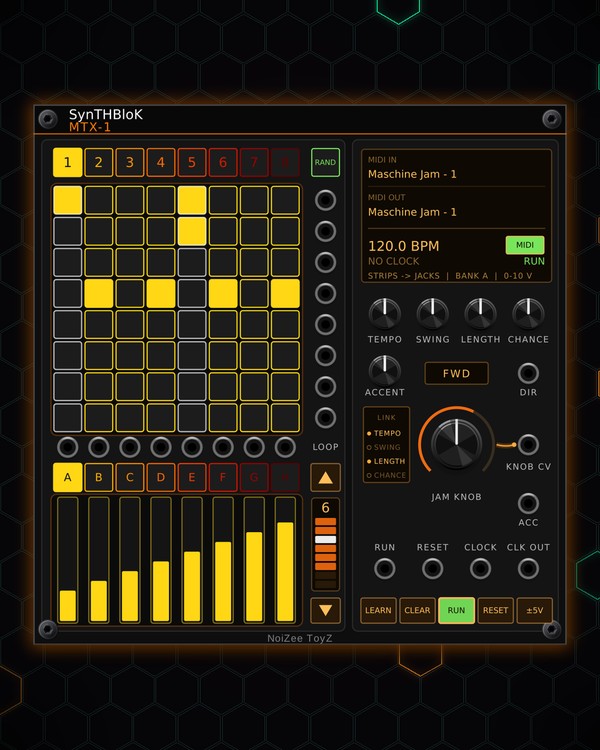
How to use
MTX-1
FREE · download it from its card
What it does
MTX-1 is a trigger sequencer: eight tracks of eight steps on an 8x8 pad grid, with eight patterns. Each track has its own trigger jack, so it plays any drum module or envelope you patch it to.
Under the grid are eight touch strips, each with a CV jack above it, in eight banks (A-H) of values: turn them into filter sweeps, levels or anything else that takes CV. It has its own tempo, so it plays with nothing patched, and you can run it from a Maschine JAM or another pad controller.
Quick start
- Patch the OUT jacks beside the grid (one per track, top row = track 1) to the trigger inputs of your drums, for example the free Kick and Snare/Hat.
- Click pads to set steps. Each row is a track, each column a step. Or press RAND for a ready-made groove on this pattern.
- Make sure RUN is lit (green). With nothing in CLOCK, MTX-1 plays at its own tempo: scroll the tempo screen, or turn TEMPO.
- Add feel with SWING and CHANCE, and pick a direction on the DIR screen.
- Patch a strip jack (above each slider) to a filter cutoff and drag the slider while it plays.
Controls
Grid and patterns
- Pads: click to set or clear a step. Ctrl-click a pad to accent that step (the column gets a white edge).
- 1-8 (the buttons over the grid): pick the pattern. Each pattern keeps its own steps and accents.
- RAND: a new groove on the pattern you are on (track 1 on the beats, track 2 on 2 and 4, track 3 the off-beats, the rest sparse). Ctrl+Z takes it back.
- CLEAR: empties the current pattern.
Timing
- TEMPO: the internal tempo (40-240 BPM) while CLOCK is unpatched. You can also scroll the tempo screen, or click it (left click up, right click down).
- SWING: the off-beat 16ths come later.
- LENGTH: how many steps play (1-8). The LOOP column does the same: ▲ / ▼ step the length, and the bar shows the looped steps and the playhead (click a cell to loop up to it).
- CHANCE: how often a set step plays. The first step of track 1 always plays, so the downbeat stays.
- DIR screen: FWD, REV, PING (ping-pong) or RAND (random). Click for the next, right-click for the previous. When the DIR jack is patched, the CV picks it instead.
- RUN and RESET: start / stop and back to step 1. A trigger at the RUN or RESET jack does the same.
Accents
- ACCENT: the voltage the ACC jack sends on accented steps (up to 10 V), held for half a step. Patch it to an accent or VCA input.
Touch strips
- Strips: drag (or click) a slider to set its voltage. It comes out of the jack above it.
- A-H: eight banks, so each strip holds eight values. Switch banks to jump all eight jacks to new values.
- ±5V: lit = the strips send -5..+5 V; off = 0..10 V. The screen shows the bank and the range.
JAM KNOB and LINK
- JAM KNOB: follows the knob on a Maschine JAM, and its voltage comes out of KNOB CV (0-10 V).
- LINK screen: click TEMPO, SWING, LENGTH or CHANCE to tie it to the JAM KNOB. Turning the knob then moves every linked control too.
Controller
- MIDI screen (top right): click the top half to pick the MIDI input, the bottom half for the output.
- MIDI key: green = MTX-1 listens to the controller; off = it ignores it and its lights go dark.
- LEARN: arm it, then press the top-left pad on the JAM so MTX-1 knows which pad page it is on.
- Right-click menu: Controller (Auto, Maschine JAM, or APC mini mk2, Launchpad Mini MK3, Launchpad X, Launchpad Pro MK3 in beta), pattern length, pad page, strip bank, the JAM light colours, the tempo and RANDOM.
- On a Maschine JAM: hold MUTE or SOLO and press a pad to mute or solo that track. PLAY starts and stops MTX-1, or starts the song when an MTX Composer is in the patch.
Jacks
Inputs
- Clock
- Reset trigger: same as pressing RESET
- Run trigger: toggles RUN, like pressing it
- Direction CV 0-2.5 V forward, 2.5-5 reverse, 5-7.5 ping-pong, 7.5-10 random
Outputs
- Accent the ACCENT level on accented steps, for half a step
- Clock out a 16th pulse from MTX-1's clock while it runs: its own tempo, or CLOCK in
- Track N trigger
- Strip N CV the slider below it, in the selected bank
- JAM knob CV 0..10 V
N = 1, 2, 3 ... (one jack per track, channel or strip). Hover a jack in Rack for the same text.
Tips
- With CLOCK unpatched, MTX-1 locks to MTX-8 (when its CLOCK is unpatched too): one tempo, steps in time, and RESET on one resets both. Patch CLK OUT to anything else that needs the same 16th-note clock.
- Pairs well with a Maschine JAM, or an APC mini mk2, Launchpad Mini MK3, Launchpad X or Launchpad Pro MK3 (beta): pick yours in the right-click menu.
- Patch a slow LFO into DIR to flip between forward and reverse as the track plays (each 2.5 V picks the next direction).
- Set CHANCE a little under full: steps drop out here and there (on every track, never the downbeat), so a groove keeps moving without new patterns.