
← Back to the MORPH card · All how-to pages
How to use
MORPH
NoiZee ToyZ pack · coming soon to VCV
What it does
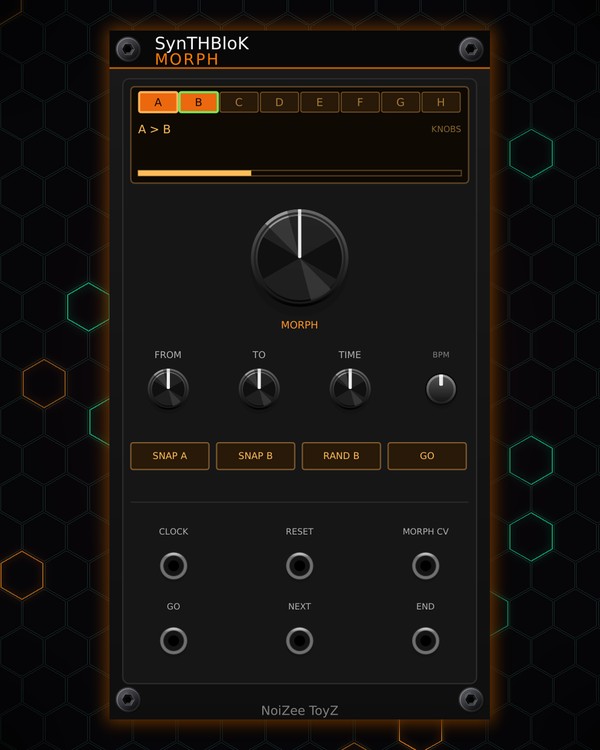
MORPH is one knob for the whole rig. It keeps 8 snapshots (A-H) of the knobs on every NoiZee ToyZ and SynTHBloK module in your rack. The big MORPH knob blends the rack from one snapshot to another, and a recall glides the rack to a snapshot over a time you set: from a click, a trigger, or a song section.
RAND B makes a new snapshot that is a small, safe variation of the first one. Knobs like master levels, tempo, key and buttons are never touched, and a knob you move by hand drops out of the morph. It moves knobs only, never cables.
Quick start
- Set up your rack's sound, then press SNAP A: the rack is captured into the FROM snapshot (A to start with).
- Change some knobs on your modules and press SNAP B to capture them into TO (B). Or press RAND B for a variation of A.
- Turn the big MORPH knob: every captured knob moves between the two snapshots.
- Press GO to glide the rack to TO over the TIME you set.
- Click a letter on the screen to glide to that snapshot.
Controls
Snapshots
- Screen: the 8 snapshots A-H (bright = used; the last recalled one is underlined). Click one to glide the rack to it. Below: FROM > TO (or GLIDE TO and a bar while it glides), how many knobs the snapshot holds, and how many you are holding by hand.
- FROM, TO: pick the two snapshots the MORPH knob blends.
- SNAP A: capture the rack's knobs into the FROM snapshot.
- SNAP B: capture them into the TO snapshot.
- RAND B: makes TO a variation of FROM, within limits that suit each knob (filters and drive move more, levels less; switches stay as they are). Ctrl+Z takes back a SNAP or RAND B.
Morph and glides
- MORPH: blends the rack from FROM (left) to TO (right). The MORPH CV jack adds to it (0-10 V).
- GO: glide the rack to TO. A trigger at the GO jack does the same.
- TIME: how long a glide takes: INSTANT, 1/4 BEAT, 1 BEAT, 1 BAR, 2 BARS, 4 BARS or 8 BARS.
- BPM: the tempo for glide times when nothing clocks MORPH (40-240). Patch a 16th-note clock into CLOCK to follow the song.
- NEXT jack: a trigger glides to the next used snapshot.
- END jack: a trigger when a glide lands.
Right-click menu
- CV picks the snapshot: the MORPH CV jack recalls a snapshot instead (0 V = A ... 7 V = H), for example from MTX COMPOSER's SECTION out.
- Re-capture the last recalled snapshot now: the snapshot takes the knobs as they are now.
- Clear a snapshot: empties A-H, one at a time.
- Leave a module alone (LOCK): tick a module and MORPH never captures or moves its knobs.
Jacks
Inputs
- Clock 16th notes
- Reset
- Morph CV 0-10 V, adds to the knob
- GO trigger glide to TO
- NEXT trigger glide to the next used snapshot
Outputs
- End a trigger when a glide lands
N = 1, 2, 3 ... (one jack per track, channel or strip). Hover a jack in Rack for the same text.
Tips
- MTX COMPOSER treats MORPH like a sequencer: the pattern a section picks for it (1-8) is the snapshot (A-H) it glides to, so the rig changes sound when the song moves on.
- When RANDROYD rolls or mutates the rack, MORPH re-captures the snapshot it last recalled, so it never drags the new sound back.
- Snapshots of MTX-8, DRUM, DUO, GRIT and more on one knob: a big filter-and-drive sweep for a build-up, then GO back for the drop.