
← Back to the Morph Filter card · All how-to pages
How to use
Morph Filter
FREE · download it from its card
What it does
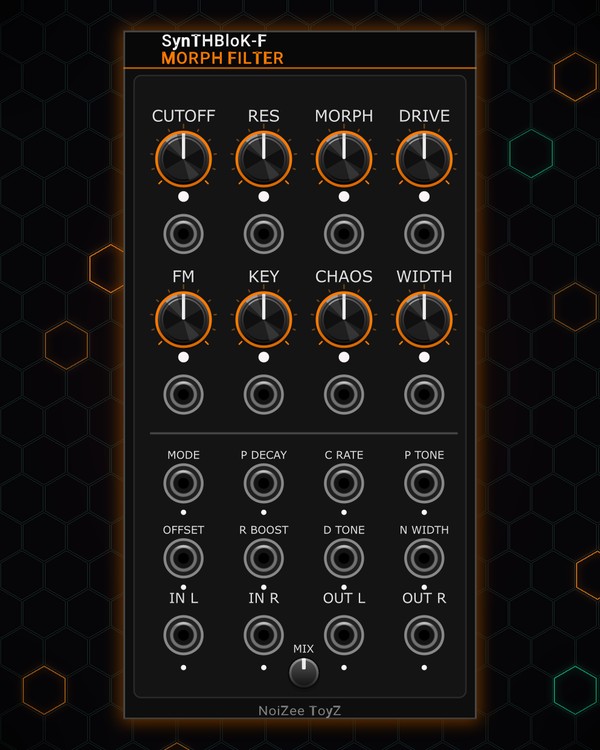
Morph Filter is a stereo filter built to be pushed hard: drive, then a stable state-variable filter whose MORPH knob slides from low-pass through band-pass to high-pass. On top there is audio-rate FM, keytracking, a random "chaos" drift of the cutoff, and a width control that can spread the left and right cutoffs apart.
Almost everything has a CV jack, and there are eight extra CV-only inputs for deeper tweaks.
Quick start
- Patch a sound into IN L (mono is fine: it feeds both sides) and OUT L / OUT R to your mixer.
- Turn CUTOFF and RES.
- Turn MORPH: left is low-pass, the middle band-pass, right high-pass.
- Add DRIVE for grit, then patch an LFO or envelope into the CUTOFF CV jack (under the knob) to make it move.
Controls
Main knobs
- CUTOFF: 20 Hz to 20 kHz. Its jack is 1 V/oct.
- RES: resonance, up to a singing peak.
- MORPH: LP → BP → HP, blended smoothly in between.
- DRIVE: pushes the input into saturation before the filter.
Movement
- FM: how much the FM jack moves the cutoff, fast enough for audio (patch an oscillator for growls and metallic tones).
- KEY: how much the KEY jack (a pitch CV) moves the cutoff. At full it tracks 1 V/oct, so the filter follows your notes.
- CHAOS: a random drift of the cutoff, up to about an octave each way. The CHAOS jack adds your own jitter source, scaled by the same knob.
- WIDTH: left of centre narrows the input towards mono; centre leaves it as it is; right of centre spreads the left and right cutoffs apart (up to half an octave each way).
- MIX: dry / wet.
Extra CV inputs (no knobs)
- MODE: shifts the morph position.
- P DECAY: damping: lower or raise the resonance by CV.
- C RATE: how fast the chaos drift moves.
- P TONE: tilts the sound between the low-pass and high-pass sides.
- OFFSET: makes the drive lopsided (more even-harmonic grit).
- R BOOST: adds extra resonance.
- D TONE: changes the drive gain.
- N WIDTH: nudges the width.
Lights
- The light under each knob shows where it sits with its CV; the small lights under the other jacks show what comes in and goes out.
Jacks
Inputs
- Cutoff CV 1V/oct
- Resonance CV
- Morph CV
- Drive CV
- Audio-rate FM
- Keytrack pitch CV
- Chaos external cutoff jitter source
- Width CV
- Mode (morph offset) CV
- Damping CV
- Chaos rate CV
- LP/HP tilt CV
- Drive asymmetry (DC offset) CV
- Resonance boost CV
- Drive gain CV
- Width offset CV
- Left in normalled to right
- Right in
Outputs
- Left out
- Right out
N = 1, 2, 3 ... (one jack per track, channel or strip). Hover a jack in Rack for the same text.
Tips
- Drive QUAD or MTX-DUO basslines into it, modulate cutoff from EUCLID triggers or an LFO, then into GRAIN-FORGE.
- Patch the same pitch CV your oscillator gets into KEY, turn KEY up full and RES high: the filter rings in tune with the notes.
- A little CHAOS with WIDTH past centre keeps a held pad moving and wide.
- Patch a slow LFO into MODE to sweep the filter type while you play.