
← Back to the MIX Fire Edition card · All how-to pages
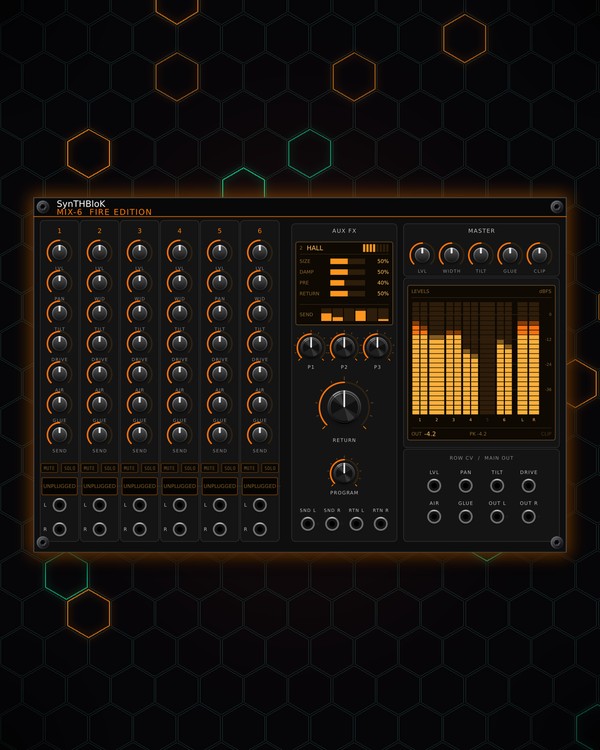
How to use
MIX Fire Edition
FREE · download it from its card
What it does
MIX Fire Edition is a stereo mixer in three sizes: MIX-6 (6 channels), MIX-8 (8) and MIX-12 (12). Every channel strip has level, pan or width, tilt EQ, drive, air, glue compression and an FX send, plus MUTE and SOLO. The knob rings glow from yellow to deep red as the value (or the CV on that row) rises.
An aux FX bus with its own reverbs, delays, chorus and flanger sits next to the strips, a master section finishes the mix, and the LEVELS screen shows every channel and the master in dBFS.
Quick start
- Patch each sound into a channel's L jack at the foot of its strip. A mono sound needs only L (it feeds both sides); patch R too for stereo.
- Patch OUT L and OUT R (under ROW CV / MAIN OUT) to your audio interface or to BloKMaster.
- Set the balance with each strip's LVL knob and place the sounds with PAN.
- Turn up a strip's SEND to feed the aux FX, pick an effect with PROGRAM, and set how much comes back with RETURN.
- Watch the LEVELS screen and keep the master under the CLIP lamp.
Controls
Channel strip (the same on every channel)
- LVL: the channel level, up to double. Its ring shows how loud the channel is coming out.
- PAN / WID: pans the channel, or sets its stereo width (left = narrower down to mono, right = wider). The label shows which; switch it in the right-click menu.
- TILT: tips the sound darker (left) or brighter (right).
- DRIVE: soft-clip saturation.
- AIR: lifts the top end (above about 8 kHz).
- GLUE: gentle compression that tames the loudest peaks.
- SEND: how much of the channel goes to the aux FX bus (after all of the above).
- MUTE: silences the channel. SOLO: plays only the soloed channels. A solo beats a mute, and turning one on turns the other off on that channel.
Aux FX
- PROGRAM: the effect: OFF, ROOM, HALL, PLATE, ECHO, PING-PONG, CHORUS or FLANGER. The screen above shows the name, the three settings and each channel's send.
- P1, P2, P3: the effect's settings, named on the screen: SIZE / DAMP / PRE for ROOM and HALL, DECAY / TONE / PRE for PLATE, TIME / FBK / TONE for ECHO and PING-PONG, RATE / DEPTH / SPREAD for CHORUS, RATE / DEPTH / FBK for FLANGER.
- RETURN: how much of the effect comes back into the master.
- SND L / SND R: the send bus out, for an outside effect. RTN L / RTN R: bring it back (RTN L alone = mono). The return is added to the onboard effect and also follows RETURN; set PROGRAM to OFF to use only the outside effect.
Master
- LVL: the master level, up to double.
- WIDTH: the stereo width of the whole mix.
- TILT: tips the whole mix darker or brighter.
- GLUE: bus compression on the whole mix.
- CLIP: how hard the master's soft clipper is driven. Turn up for a louder, more saturated mix.
Row CV
- LVL, PAN, TILT, DRIVE, AIR, GLUE (under ROW CV / MAIN OUT): each moves that knob on every channel at once.
- LVL: 5 V leaves the levels as set; each volt above or below adds or takes 0.6 dB (0-10 V = -3 to +3 dB).
- PAN and TILT: ±5 V sweeps the full range. DRIVE, AIR and GLUE: 0-10 V adds up to the full range.
LEVELS screen
- L and R bars for every channel plus the master, in dBFS, with peak hold. The master's peak is written under the bars, and the CLIP lamp lights when the master clips.
- Channel numbers turn red when muted and yellow when soloed, and dim when unpatched or silenced by a solo.
- Click the screen to clear the peaks and the clip lamp.
Right-click menu
- PAN / WIDTH knob: All channels: pan, All channels: stereo width, or Per channel to switch single channels. On MIX-8 and MIX-12 every channel starts on pan; on MIX-6, channels 1 and 5 pan and the others start on width.
- MIX-8 and MIX-12: when RANDROYD (from the NoiZee ToyZ pack) builds a track, it gives each channel a level target. The channel learns its part's loudness for 10 seconds while it plays, settles the level there, then holds, so your own level moves stay put. Auto trim: learn the levels again (10 s) then appears in the menu.
Jacks
MIX-6 Fire Edition
Inputs
- Global 1 Level row
- Global 2 Pan/Width row
- Global 3 Tilt row
- Global 4 Drive row
- Global 5 Air row
- Global 6 Glue row
- CH 1 L
- CH 1 R
- CH 2 L
- CH 2 R
- CH 3 L
- CH 3 R
- CH 4 L
- CH 4 R
- CH 5 L
- CH 5 R
- CH 6 L
- CH 6 R
- FX return left mono if R unpatched
- FX return right
Outputs
- Master left
- Master right
- FX send left
- FX send right
MIX-8 Fire Edition
Inputs
- CH N L
- CH N R
- Global N ... row
- FX return left mono if R unpatched
- FX return right
Outputs
- Master left
- Master right
- FX send left
- FX send right
MIX-12 Fire Edition
Inputs
- CH N L
- CH N R
- Global N ... row
- FX return left mono if R unpatched
- FX return right
Outputs
- Master left
- Master right
- FX send left
- FX send right
N = 1, 2, 3 ... (one jack per track, channel or strip). Hover a jack in Rack for the same text.
Tips
- Use WID on stereo sources (pads, synths with their own stereo) and PAN on mono ones (kick, bass, single voices).
- Patch a slow LFO into the row TILT jack to open and close the whole mix together, like a DJ filter sweep.
- Pairs well with Kick, Snare/Hat, QUAD and POLY as sources, CHARACTER DELAY on the aux bus (through SND / RTN), and BloKMaster on the master out.
- Leave CLIP low and do the final loudness in BloKMaster, so the master keeps its punch.