
← Back to the GRIT card · All how-to pages
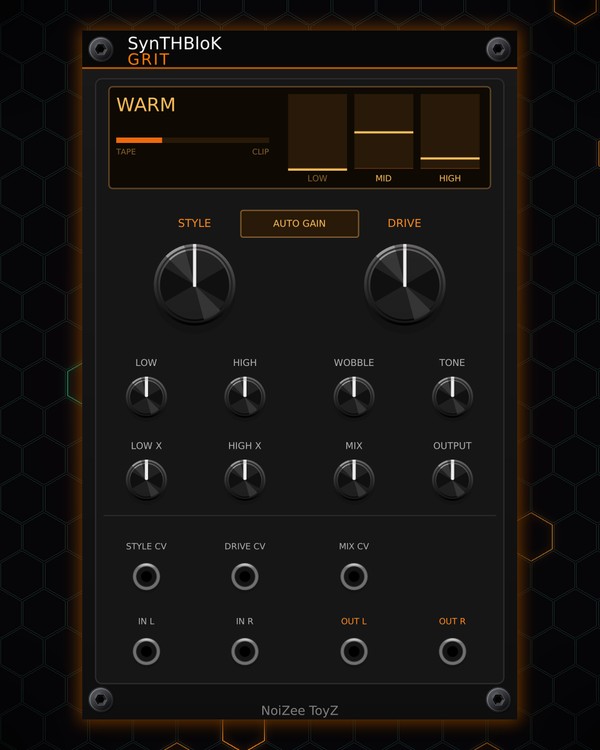
How to use
GRIT
NoiZee ToyZ pack · coming soon to VCV
What it does
GRIT is a saturator that splits the sound into three bands (LOW, MID, HIGH) and drives each one on its own. The big DRIVE knob works on the mids (200 Hz to 2 kHz by default), where a kick or bass gets its bite, while the sub can stay completely clean.
STYLE moves the character from soft tape, through warm and driven, to crunch and hard clipping. Add tape wobble, tilt the tone, blend it with the dry sound, and let AUTO GAIN keep the level steady so the knobs add grit, not volume.
Quick start
- Patch your sound into IN L (and IN R for stereo; with only IN L patched, both sides get it). Take OUT L / OUT R to your mixer.
- Turn DRIVE up until the mids start to bite.
- Turn STYLE: left for round tape warmth, right for crunch and hard clip. The screen names the style (TAPE, WARM, DRIVE, CRUNCH, CLIP).
- Leave LOW at 0 to keep the sub clean, or bring it up a little for a thicker bottom.
- Or start from a preset: right-click the module, Presets.
Controls
The two big knobs
- STYLE: the kind of saturation, from TAPE (soft, warm) through WARM, DRIVE and CRUNCH to CLIP (hard clipping).
- DRIVE: how hard the mid band (between LOW X and HIGH X) is pushed.
Bands
- LOW: drive on the low band. At 0 the low band passes through untouched.
- HIGH: drive on the high band.
- LOW X: where the low band ends and the mids start (40-600 Hz).
- HIGH X: where the mids end and the high band starts (800 Hz-8 kHz).
Colour and level
- WOBBLE: tape wow and flutter.
- TONE: tilts the sound darker (left) or brighter (right).
- MIX: dry to wet.
- OUTPUT: the output level, -12 to +12 dB.
- AUTO GAIN (the button under the screen): lit = the wet sound follows the input's loudness, so turning up DRIVE adds grit without getting louder.
Screen
- Shows the style name, the last preset picked, a TAPE-to-CLIP bar, and three columns for LOW, MID and HIGH: the line is the knob, the fill is how hard that band is being driven right now. The crossover frequencies sit between the columns.
CV and menu
- STYLE CV, DRIVE CV, MIX CV: add to their knobs; ±5 V covers the whole range.
- Right-click menu: Presets: WARM TAPE, DUB TAPE, GLUE, MID CRUNCH, INDUSTRIAL, HARDCORE and GABBER.
Jacks
Inputs
- Left or mono
- Right
- Style CV +-5 V = the whole range
- Drive CV +-5 V = the whole range
- Mix CV +-5 V = the whole range
Outputs
- Left
- Right
N = 1, 2, 3 ... (one jack per track, channel or strip). Hover a jack in Rack for the same text.
Tips
- Weight for MTX-DUO bass and MTX-DRUM: the mids get the bite while the sub stays clean. Follow it with GLITCH-ECHO or BLOKMASTER.
- GLUE is a light sheen for almost anything; HARDCORE and GABBER clip everything but keep the sub.
- Patch a slow LFO into STYLE CV so the drive slides between tape and clip over a few bars.
- Turn MIX down from full for parallel saturation: the dry punch stays and the grit sits on top.