
← Back to the GRAIN-FORGE card · All how-to pages
How to use
GRAIN-FORGE
FREE · download it from its card
What it does
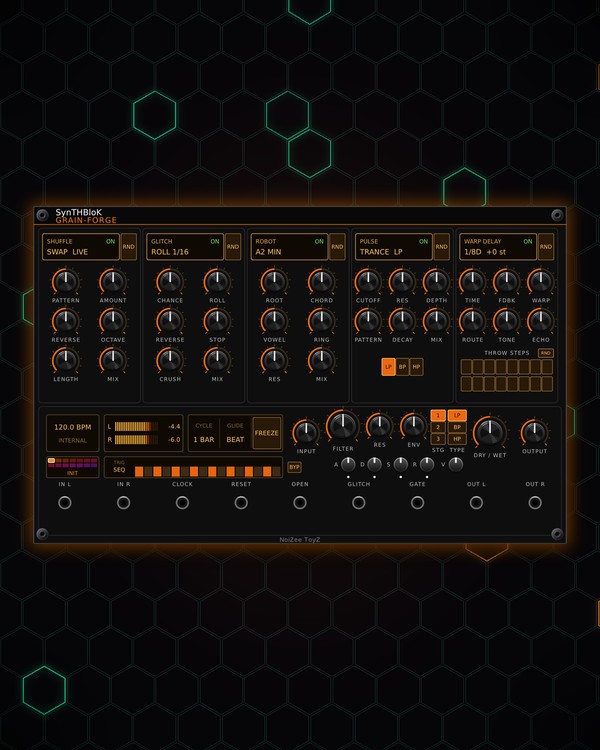
GRAIN-FORGE is a clock-locked stereo effects chain with five stages in a row: SHUFFLE rearranges the beat, GLITCH breaks it up, ROBOT turns it into a singing vocoder chord, PULSE gates and filters it in time, and WARP DELAY echoes it. The delay's repeats can loop back through ROBOT and PULSE, so the echoes get sung and chopped as they cycle.
After the chain there is a master filter with its own envelope and a 16-step filter sequencer. Each stage can pick new musical settings by itself as the track plays, and there are ready-made presets.
Quick start
- Patch a drum loop or a stereo bus into IN L / IN R (IN L alone feeds both sides), and OUT L / OUT R to your mixer.
- Patch your 16th-note clock into CLOCK (with nothing patched it runs at 120 BPM). The status screen shows the tempo and the step.
- Click the preset name (bottom left) to step through the presets, or click a coloured cell above it to jump to one.
- Set the overall amount with DRY / WET.
- Click a stage's header screen to switch that stage on or off, and turn its knobs.
Controls
The five stages
- SHUFFLE: a beat slicer. On each step it may play a different slice of the last LENGTH (1 beat, 2 beats or 1 bar). PATTERN picks the order (SWAP, BACKWARD, DOUBLE, HALF, LOOP, THIRDS, SCATTER, RANDOM), AMOUNT how often a step is moved, REVERSE and OCTAVE how often a moved slice plays backwards or an octave up or down, MIX its level.
- GLITCH: on each step, with CHANCE, a roll (size set by ROLL, 1/4 down to 1/64), a reverse or a tape-stop (how often each by REVERSE and STOP). CRUSH lowers the bits and sample rate. MIX is its level.
- ROBOT: a vocoder: the input speaks through a buzzing chord. ROOT (A1-A3) and CHORD (HARM, FIFTH, MAJ, MIN, SUS4, MAJ7, MIN7, CLUSTER) set the notes, VOWEL sweeps A-E-I-O-U, RING adds ring-mod, RES sharpens the vowel, MIX its level.
- PULSE: a gate and filter that hits in time. PATTERN picks the rhythm (16THS, 8THS, OFFBEAT, TRANCE, DOTTED, SYNCO, BUILD, RANDOM); each hit opens the gate and sweeps the filter by DEPTH, for DECAY long. CUTOFF, RES and LP / BP / HP set the filter, MIX its level.
- WARP DELAY: a clock-locked echo. TIME in note values (1/64 up to 1 BAR, with triplets and dotted), FDBK the repeats, WARP shifts each repeat's pitch (±12 semitones), ROUTE sends repeats back through ROBOT and PULSE, TONE darkens or brightens them, ECHO is the echo level.
- THROW STEPS: 16 buttons, one per step of the bar. Only lit steps are sent into the delay. The small RND button deals a new random throw pattern.
Stage headers and RANDOM
- Header screens: the stage name, ON / OFF and what it is doing now. Click to switch the stage on or off.
- RND (beside each header): that stage picks new musical settings by itself (in key and on the grid; your MIX levels stay as they are). Switch settings change on the downbeat, knobs glide there.
- RANDOM screen: CYCLE (how often new picks come: 1 beat to 8 bars), GLIDE (how fast the knobs travel: SNAP, FAST, BEAT, BAR, DRIFT) and FREEZE (hold the current picks). Click or scroll up for the next value, right-click or scroll down for the previous.
Presets
- Preset screen: click a coloured cell to load that preset, click the name for the next one, right-click for the list. Presets: INIT, DUB ECHO, RETRO FORMANT, TRANCE GATE, STUTTER ROLL, HALF TIME, LO-FI TAPE, SHIMMER, ROBO DUB, DRUM BUS, BASS, LEAD, PADS, and SMART RND (a new random setting in a random key every time you pick it again).
Master filter
- FILTER: the cutoff. TYPE picks LP, BP or HP; STG 1, 2 or 3 stages (12, 24 or 36 dB). Low-pass fully open (or high-pass fully down) switches it off.
- RES: resonance. ENV: how far the envelope sweeps the cutoff, up (right) or down (left).
- A, D, S, R: the filter envelope. V: lets the envelope shape the level too, for plucks and gates.
- SEQ screen: left, TRIG picks what fires the envelope: BEAT, STEP, PULSE hits, GLITCH events, SEQ steps or the GATE jack (click for the next). Right, 16 bars: click one to switch it on or off, drag across them to draw heights (notes in ROBOT's key). Right-click for the trigger, the length (4, 8, 12 or 16), Randomize pattern, Default pattern and Clear.
- BYP: takes the envelope and sequencer off the filter.
Levels and jacks
- INPUT, DRY / WET, OUTPUT. The meter shows the output level; click it to reset the peak hold.
- RESET: back to step 1. OPEN: while high, PULSE lets everything through. GLITCH: a trigger fires a glitch right now. GATE: plays the filter envelope when TRIG is set to GATE.
Jacks
Inputs
- Left
- Right left is copied here when unpatched
- Clock 16th notes; 120 BPM internal when unpatched
- Reset
- Open (gate) PULSE lets everything through while high
- Glitch now trigger
- Filter env gate fires the ADSR when TRIG is GATE; holds while high
Outputs
- Left
- Right
N = 1, 2, 3 ... (one jack per track, channel or strip). Hover a jack in Rack for the same text.
Tips
- Clock-locked: pair it with EUCLID or MTX-8, and run drum buses from KICK and SNARE/HAT through it for glitch fills.
- Light only the last few THROW STEPS of the bar for dub throws at the end of each phrase.
- Turn up ROUTE with a little WARP and the echoes climb or fall in pitch while ROBOT and PULSE reshape them.
- Patch a fill trigger into GLITCH and a gate into OPEN to play breaks and drop-outs by hand.