
← Back to the Dual Filter card · All how-to pages
How to use
Dual Filter
FREE · download it from its card
What it does
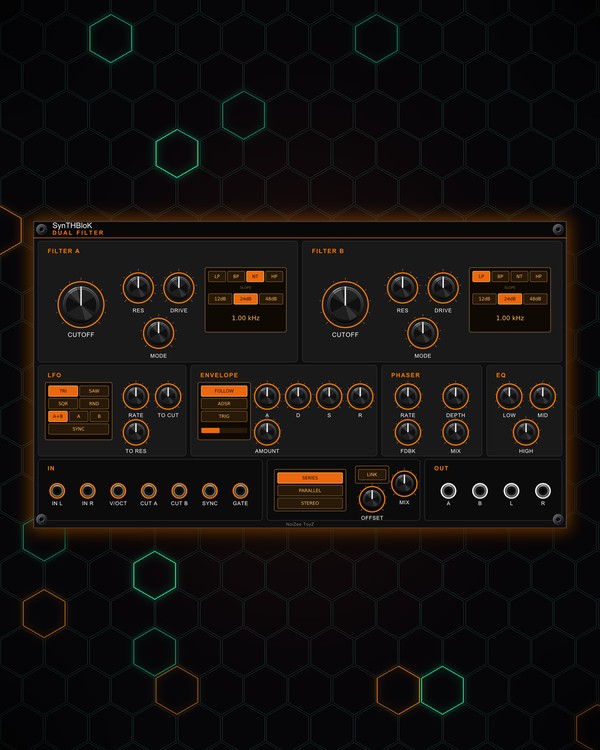
Dual Filter is two stereo multimode filters, A and B. Each sweeps smoothly from low-pass through band-pass and notch to high-pass, at 12, 24 or 48 dB per octave, with its own drive. Run them one after the other, side by side, or one on each stereo channel, and link B's cutoff to A's.
A four-shape LFO and an envelope (ADSR or an envelope follower) move the cutoffs, and a stereo phaser and three-band EQ finish the sound.
Quick start
- Patch a sound into IN L (mono is fine: it feeds both sides) and patch L and R out to your mixer.
- Turn filter A's CUTOFF and RES. Pick the filter type by turning MODE or clicking LP, BP, NT or HP on the screen.
- Click a slope on the screen (12dB, 24dB or 48dB).
- Pick the routing: SERIES (A into B), PARALLEL or STEREO (A left, B right), and set filter B the same way.
- Turn up TO CUT to let the LFO sweep the cutoff, or set AMOUNT for the envelope.
Controls
Filter A and Filter B
- CUTOFF, RES, DRIVE: cutoff, resonance and drive. Drive thickens the sound more than it makes it louder.
- MODE: sweeps LP → BP → NT (notch) → HP. In between, it blends the two nearest types.
- Screen: the lit cell shows the type; click LP, BP, NT or HP to jump there. Click 12dB, 24dB or 48dB for the slope. The bottom line shows the cutoff in Hz.
Routing
- SERIES, PARALLEL, STEREO: A into B, both on the input mixed together, or A on the left and B on the right.
- LINK: B's cutoff follows A's. OFFSET sets how many octaves above (or below) A it sits.
- MIX: dry / wet.
LFO
- TRI, SAW, SQR, RND: the LFO shape (RND = a new random step each cycle).
- A+B, A, B: which filter the LFO moves.
- RATE, TO CUT, TO RES: speed, and how much it moves the cutoff and the resonance.
- SYNC: locks the LFO to a clock on the SYNC jack; RATE then picks the clock division, and the cycle starts on the clock.
Envelope
- FOLLOW: the envelope follows the input level. ADSR: a regular envelope played by the GATE jack or the TRIG cell (hold it for a long gate). The bar under the cells shows the envelope.
- A, D, S, R: the ADSR times and sustain level.
- AMOUNT: how far the envelope moves both cutoffs, up (right) or down (left).
Phaser and EQ
- RATE, DEPTH, FDBK, MIX: a stereo phaser after the filters (off until you raise its MIX).
- LOW, MID, HIGH: a three-band EQ at the very end, boost or cut.
Jacks
- V/OCT moves both cutoffs, CUT A and CUT B each filter on its own (1 V/oct).
- A and B outputs: each filter on its own (mono), besides the main L / R pair.
Jacks
Inputs
- Left or mono
- Right normalled to left
- Cutoff V/oct both filters
- Filter A cutoff CV 1 V/oct
- Filter B cutoff CV 1 V/oct
- LFO sync clock
- Envelope gate ADSR
Outputs
- Filter A mono
- Filter B mono
- Left
- Right
N = 1, 2, 3 ... (one jack per track, channel or strip). Hover a jack in Rack for the same text.
Tips
- Made for QUAD and POLY voices; its envelope follower also rides drums from KICK and SNARE/HAT. Follow with CHARACTER DELAY.
- STEREO routing with LINK on and a small OFFSET gives a wide, moving image from a mono source.
- Choose FOLLOW and set a positive AMOUNT for an auto-wah that opens harder the louder you play.
- Patch the note pitch into V/OCT so the filter tracks the keyboard, with RES high for a whistling, tuned resonance.