
← Back to the DREAM LAB card · All how-to pages
How to use
DREAM LAB
NoiZee ToyZ pack · coming soon to VCV
What it does
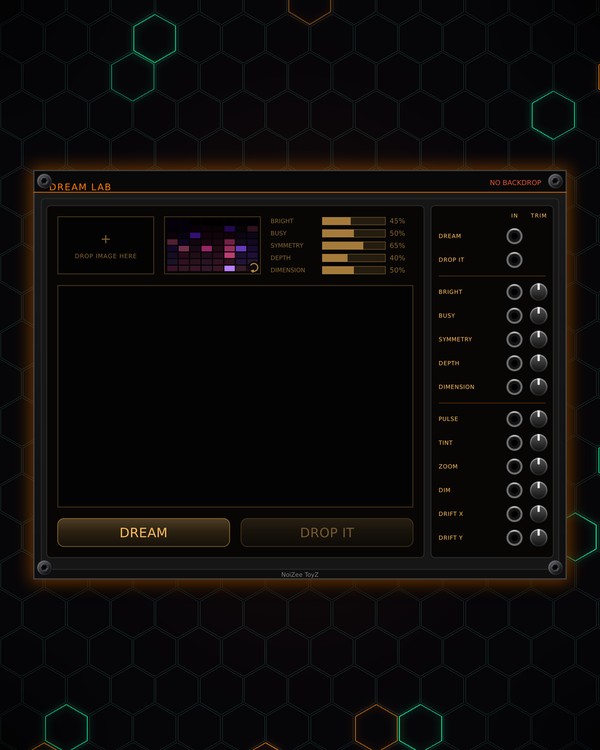
DREAM LAB is BACKDROP's expander: it dreams up new backgrounds for your rack. Drop in one picture (or none) and its colours lead; set five sliders, press DREAM, and a new piece of generated art appears in the viewer. DROP IT puts it on the rack and saves it with your images.
It works for the BACKDROP beside it (either side), or the first BACKDROP in the patch. Its CV inputs can trigger a new dream, flash the background, shift its colour, and zoom or drift it, so the background can move with the music.
Quick start
- Add a BACKDROP first, then press DREAM on BACKDROP's screen: DREAM LAB appears on its right. Until you dream, its viewer shows the rack's background.
- Drag a picture file onto the DROP IMAGE HERE box (or click the box to pick a file). Its colours fill the palette next to it.
- Set BRIGHT, BUSY, SYMMETRY, DEPTH and DIMENSION.
- Press DREAM. Don't like it? Press it again, or click the palette to roll a new set of colours first.
- Press DROP IT: the dream goes on the rack at once, and a full-size copy is saved in your BACKDROP images folder.
Controls
Picture and colours
- Picture box: drop a picture on it, or click it to pick one. One picture at a time: a new one replaces the last. The small × in its corner takes it out (then DREAM LAB makes up its own colour schemes).
- Palette: 64 colours from your picture, darkest first. The lit ones are in play. Click it to roll a new handful (with no picture: a whole new scheme).
The dice
- BRIGHT: how bright the background may get.
- BUSY: how much detail.
- SYMMETRY: how symmetrical.
- DEPTH: how much depth; sometimes the dream is lit like a sculpted surface.
- DIMENSION: low = flat patterns (fractals, quasicrystals, sacred-geometry line sets); high = shapes seen out of higher dimensions (solids, the 4D cube, tunnels, 3D attractors, Calabi-Yau, E8).
- BRIGHT and BUSY follow your picture until you drag them. The sliders bend the dice; they never fix the result. Drag them left and right.
Dream
- DREAM: a new dream in the viewer.
- DROP IT: puts the dream on the rack (it crossfades in) and saves it full size (1920 x 1200) in your BACKDROP images, so it shows up on BACKDROP's IMAGE page.
CV inputs (each with a TRIM, -100 % to +100 %)
- DREAM, DROP IT: triggers, like the keys. A DREAM trigger also crossfades the new dream onto the rack straight away.
- BRIGHT, BUSY, SYMMETRY, DEPTH, DIMENSION: 0-10 V added to the slider (a tick on the slider shows the CV).
- PULSE: flashes the background (0-10 V; a short trigger still shows).
- TINT: shifts the background's colour; it wraps around every 10 V.
- ZOOM: 1x to 2x. DIM: darkens it. DRIFT X, DRIFT Y: slide it (-5..5 V).
Right-click menu
- Release from BACKDROP: lets DREAM LAB go so it moves on its own (pulling it 25 HP away does the same, and so does the small tab on the seam). Push it back against BACKDROP's side to stick it again.
- Clear the dream on the rack: back to BACKDROP's own background.
Jacks
Inputs
- Dream trigger: a new dream, as the DREAM key; it crossfades onto the rack
- Drop it trigger: as the DROP IT key
- Bright CV 0-10 V, through its trim, added to the BRIGHT slider
- Busy CV 0-10 V, through its trim, added to the BUSY slider
- Symmetry CV 0-10 V, through its trim, added to the SYMMETRY slider
- Depth CV 0-10 V, through its trim, added to the DEPTH slider
- Dimension CV 0-10 V, through its trim, added to the DIMENSION slider
- Pulse 0-10 V: flashes the background
- Tint the hue; it wraps every 10 V
- Zoom 0-10 V: 1x-2x
- Dim 0-10 V
- Drift X -5..5 V
- Drift Y -5..5 V
N = 1, 2, 3 ... (one jack per track, channel or strip). Hover a jack in Rack for the same text.
Tips
- Patch a kick into PULSE and MTX COMPOSER's SECTION out into TINT for a background that moves with the song.
- Stuck to BACKDROP, DREAM LAB moves with it and folds away when BACKDROP collapses; its jacks keep working.
- Send a clock divided down to every few bars into the DREAM jack for a background that keeps changing on its own.