
← Back to the CLOKWORX card · All how-to pages
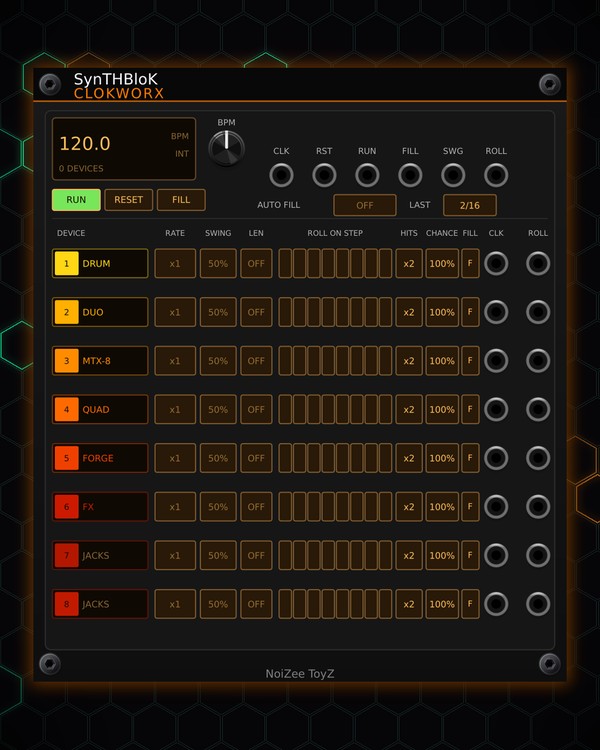
How to use
CLOKWORX
NoiZee ToyZ pack · coming soon to VCV
What it does
CLOKWORX is one master clock for up to eight devices, each on its own lane. A lane can run an MTX module with no cable at all (it takes over that module's clock), or any module through the lane's CLK jack. Either way, every lane gets its own rate, swing and polymeter length, without changing the patterns themselves.
Each lane can also roll: a true roll repeats a step 2 to 4 times while the sequence holds still, set by step, by chance or with FILL. Stop-time breaks drop chosen lanes to silence at the end of a section, the classic pause before a drop.
Quick start
- Click a lane's name (it reads JACKS while empty) and pick a module from the list, for example MTX-DRUM. Or right-click the module and choose Fill empty lanes with free MTX modules.
- Make sure RUN is lit. With nothing in CLK, CLOKWORX plays at the BPM knob's tempo; patch a 16th-note clock into CLK to follow it instead.
- Set the lane's RATE: x2 for double time, /2 for half time, TRIP or DOT for triplet and dotted feels.
- Light a few ROLL ON STEP cells, set HITS to 2-4, and hear those steps roll.
- Hold FILL going into the next section: every lane with its F lit rolls on every step.
Controls
Master
- BPM knob: the tempo while the CLK jack is unpatched (40-240). The screen shows the tempo, INT or EXT (following CLK), how many devices are running, and STOP or FILL while they happen.
- RUN: starts and stops every lane. Starting plays step 1 everywhere.
- RESET: every lane and its device back to step 1.
- FILL: hold it and every lane whose F is lit rolls on every step.
- AUTO FILL: the same fill by itself, every 1, 2, 4, 8 or 16 bars (OFF to turn it off). LAST sets how many 16ths at the end of those bars it fills (1-8).
Lanes
The value cells work like knobs: drag up or down to change them.
- DEVICE: the lane's name. Click it to pick the module this lane drives, or "Nothing (CLK / ROLL jacks only)". The list shows the MTX modules in the patch and marks ones already on another lane or held by another CLOKWORX. A lane can run MTX-8, MTX-DRUM, MTX-DUO, MTX FORGE, MTX Quad, MTX-FX, GLITCH-ECHO, MORPH and SYMPHONICS.
- RATE: /4, /3, /2, DOT, 3/4, x1, 4/3, TRIP, x2, x3 or x4 of the master clock, always locked to it.
- SWING: 50 % (straight) up to 75 %, on every second tick.
- LEN: polymeter: the lane restarts its device every 1-16 ticks (OFF = no restart).
- ROLL ON STEP: eight cells, one per step. A lit cell rolls that step. The ring shows which step the lane is on.
- HITS: how many times a rolled step plays (x2 to x4).
- CHANCE: how often a lit roll cell really rolls.
- F: lit = this lane rolls on FILL and AUTO FILL.
- CLK / ROLL (jacks at the end of each lane): a trigger per tick, and a trigger on each extra roll hit, for any module.
Jacks across the top
- CLK: a 16th-note clock in (the BPM knob when unpatched).
- RST, RUN: a trigger resets, or toggles RUN.
- FILL: a gate; every lane with F lit rolls while it is high.
- SWG: ±5 V adds to every lane's swing.
- ROLL: 0-10 V adds to every lane's roll chance.
Right-click menu
- Fill empty lanes with free MTX modules, and Empty every lane (devices go back to their own clocks).
- STOP: Sections that end in a stop (A-H), Section length (1-16 bars), Stop length (the last 1-16 16ths of the section) and Lanes that stop. In a stop the lanes stay in time, they just go silent. Sections are counted from RESET.
- Every lane back to x1, no swing, no rolls.
Jacks
Inputs
- Clock 16th notes; the BPM knob when unpatched
- Reset
- Run a trigger toggles RUN
- Fill gate: every lane rolls while high
- Swing CV +-5 V adds to every lane's swing
- Roll chance CV 0-10 V adds to every lane's chance
Outputs
- clock a trigger per tick
- roll a trigger on each extra roll hit
N = 1, 2, 3 ... (one jack per track, channel or strip). Hover a jack in Rack for the same text.
Tips
- Clocks MTX-8, MTX-DRUM and MTX-DUO at their own rates with rolls, or any module by its CLK jack.
- Put the drums on x1 and a melody lane on /2 or TRIP for a half-time or triplet counter-line from the same patterns.
- Set LEN to 5, 6 or 7 on one lane for a polymeter that drifts against the bar and comes back round.
- Set the stop's section length to match your MTX Composer's cycle, so the silence lands right before the next section.