
← Back to the Character Delay card · All how-to pages
How to use
Character Delay
FREE · download it from its card
What it does
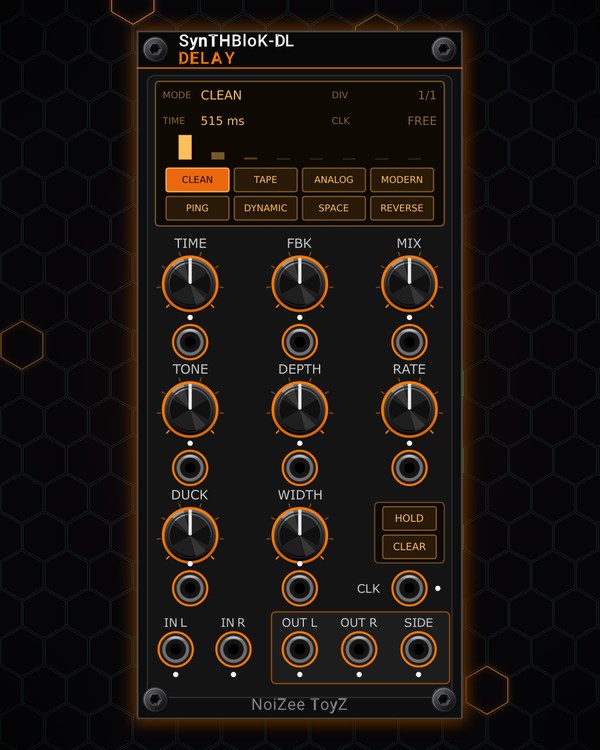
Character Delay is a stereo delay with eight characters: CLEAN, TAPE, ANALOG, MODERN, PING-PONG, DYNAMIC, SPACE and REVERSE. Set the time by hand (20 ms up to 2 seconds) or patch a clock and the echoes lock to the beat.
Ducking keeps the echoes out of the way while you play, HOLD freezes what is in the buffer into a loop, and the screen shows the mode, the time, the tempo and how the repeats fade.
Quick start
- Patch a sound into IN L (mono is fine: it feeds both sides) and OUT L / OUT R to your mixer.
- Click a mode cell on the screen, for example TAPE.
- Set TIME, FBK (how many repeats) and MIX.
- To lock it to the beat, patch a clock into CLK: the delay time becomes one clock interval, and the screen shows the BPM.
Controls
Screen
- Mode cells: click CLEAN, TAPE, ANALOG, MODERN, PING, DYNAMIC, SPACE or REVERSE.
- DIV: with a clock patched, the delay is 1/1, 3/4 or 2/3 of the clock interval. Click or scroll up for the next, right-click or scroll down for the previous.
- TIME and CLK: the delay time in use, and the clock's tempo (FREE when no clock is patched).
- Bars: one bar per echo, showing how fast the repeats die away.
Delay
- TIME: 20 ms to 2 s. With CLK patched, the clock sets the time instead (its CV jack still adds on top).
- FBK: feedback: how many repeats.
- MIX: dry / wet.
Character
- TONE: darker or brighter echoes, in every mode.
- DEPTH and RATE: a wobble on the echoes (TAPE has its own wow and flutter; REVERSE has none).
- WIDTH: how wide the echoes spread in stereo.
- DUCK: the echoes dip while the input is playing and come back up in the gaps.
Hold and clear
- HOLD: freezes the buffer: new sound is not recorded, and what is there loops without fading. Click again to let go.
- CLEAR: wipes the buffer (instant silence of the echoes).
Jacks
- Each knob has a CV jack below it.
- SIDE: the stereo side of the echoes on its own.
Jacks
Inputs
- Time CV
- FBK CV
- Mix CV
- Tone CV
- Depth CV
- Rate CV
- Duck CV
- Width CV
- Clk
- In L
- In R
Outputs
- Out L
- Out R
- Side
N = 1, 2, 3 ... (one jack per track, channel or strip). Hover a jack in Rack for the same text.
Tips
- The send effect for the MIX Fire aux bus; clock it from EUCLID or the MTX sequencers so the repeats sit on the beat.
- With one clock pulse per beat, DIV 3/4 gives dotted-eighth echoes and 2/3 gives triplet echoes.
- Build a phrase with FBK high, then press HOLD to loop it and play over the top. CLEAR when you are done.
- DUCK about halfway keeps vocals or leads clear while the echoes fill the gaps.