
← Back to the BloKMaster card · All how-to pages
How to use
BloKMaster
FREE · download it from its card
What it does
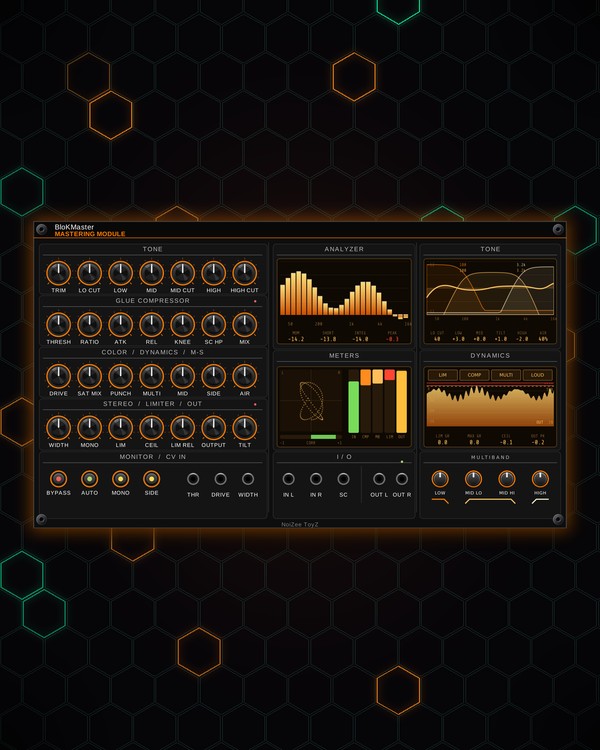
BloKMaster is a full mastering chain in one panel, built to sit last in your rack. Your stereo mix runs through input trim and filters, a tone EQ, mid / side gain, a glue compressor, a three-band leveler, saturation, punch, stereo width and a look-ahead limiter, then out.
Four screens show what is happening: a spectrum analyzer with loudness readings, the EQ curve, a vectorscope with level and gain-reduction meters, and a scrolling history of the limiter, compressor, leveler or loudness.
Quick start
- Patch your mixer's stereo out into IN L and IN R, and OUT L / OUT R to your audio interface. A mono source in IN L alone feeds both sides.
- Shape the tone with LOW, MID, HIGH and AIR while you watch the TONE screen.
- Glue the mix: lower THRESH until the CMP meter shows a few dB of gain reduction, with RATIO around 2:1.
- Push the loudness: turn LIM down to drive the mix into the limiter, and set CEIL a little under 0 dB.
- Watch the ANALYZER loudness readout and press BYPASS now and then to compare with the raw mix.
Controls
Input
- TRIM: input level, ±12 dB.
- LO CUT: a high-pass filter (20-300 Hz) to clear rumble. Fully left (20 Hz) = off.
- HIGH CUT: a low-pass filter (2-20 kHz). Fully right (20 kHz) = off.
Tone EQ
- LOW: low shelf at 120 Hz, ±12 dB.
- MID: a bell at 1 kHz, ±12 dB.
- MID CUT: scoops the mids at 1 kHz; fully up = -24 dB.
- HIGH: high shelf at 6 kHz, ±12 dB.
- TILT: tips the whole mix darker (left) or brighter (right), around 650 Hz.
- AIR: a gentle lift at 12 kHz for sparkle (up to +9 dB).
- MID and SIDE (in the COLOR / DYNAMICS / M-S row): the level of the centre and of the stereo sides, ±6 dB each.
Glue compressor
- THRESH: where compression starts (-40 to 0 dB). The THR jack moves it (4 dB per volt).
- RATIO: how hard it compresses, 1:1 to 20:1.
- ATK and REL: attack (0.1-100 ms) and release (20-1000 ms).
- KNEE: how gently compression comes in (0-12 dB). Higher = softer.
- SC HP: a high-pass on what the compressor listens to (20-400 Hz), so the kick doesn't pump the whole mix. 20 Hz = off.
- MIX: parallel compression: blends the dry and the compressed mix.
- AUTO: adds make-up gain to win back the level the compressor takes.
- SC jack: patch another signal (a kick, for example) and the compressor listens to it instead of the mix.
Leveler
- MULTI: how much the three-band leveler evens out the lows, mids and highs. Each band is gently turned down when it jumps up and brought up when it drops. At zero it is off.
- LOW, MID LO, MID HI, HIGH (the MULTIBAND knobs): where the bands split. LOW = the top of the low band, MID LO and MID HI = the bottom and top of the mid band, HIGH = the bottom of the high band.
- Right-click menu, under Multiband leveler: the leveler's speed (slow to fast) and range (how much it may cut; it boosts a little over half of that).
Saturation and punch
- DRIVE: warm saturation, 0-24 dB. The DRIVE jack adds to it (2.4 dB per volt).
- SAT MIX: blends the dry and the saturated sound.
- PUNCH: lifts the attack of each hit (kicks, snares) up to 10 dB.
Stereo
- WIDTH: stereo width from mono (left) through normal (centre) to extra wide (right). The WIDTH jack moves it (20% per volt).
- MONO: makes everything below this frequency mono (20-300 Hz), for tight bass. 20 Hz = off.
Limiter and output
- LIM: pushes the mix into the limiter. The lower you set it, the louder the master gets.
- CEIL: the highest the limiter lets the peaks go (-6 to 0 dB).
- LIM REL: how fast the limiter lets go (10-200 ms).
- OUTPUT: the final level, ±12 dB, after the limiter. Above 0 dB it can push past CEIL.
Monitor buttons
- BYPASS: hear the mix without BloKMaster (a smooth crossfade, no click).
- AUTO: the compressor's make-up gain (see above).
- MONO: mono check: hear the master folded to mono.
- SIDE: hear only the stereo sides (what is different between left and right).
Screens
- ANALYZER: the spectrum, and under it the loudness in LUFS: MOM (momentary), SHORT (short-term), INTEG (integrated, the whole song) and the PEAK, which turns red near 0 dB. Click the readout to restart the integrated reading (also in the right-click menu: Restart integrated loudness).
- TONE: the EQ curve from the knobs, the leveler's band edges, and a readout of LO CUT, LOW, MID, TILT, HIGH and AIR.
- METERS: a vectorscope with a correlation bar (CORR, -1 to +1), and bars for input level, gain reduction of the compressor (CMP), leveler (MB) and limiter (LIM), and output level.
- DYNAMICS: a scrolling history. Click LIM, COMP, MULTI or LOUD along its top, or click the screen to step through them.
- The small red lights by the compressor and limiter headings glow with gain reduction; the green light by the outputs shows the stereo correlation.
Jacks
Inputs
- Left in
- Right in normalled to left
- External sidechain for the compressor
- Compressor threshold CV 4 dB per volt
- Saturation drive CV 2.4 dB per volt
- Stereo width CV 20% per volt
Outputs
- Left out
- Right out
N = 1, 2, 3 ... (one jack per track, channel or strip). Hover a jack in Rack for the same text.
Tips
- Use it as the last module in the rack: after MIX Fire or the MTX mix, with STEREO PHASER just before it.
- Set the MONO knob to about 100-150 Hz for a tight, centred low end, and press the MONO button now and then: anything that vanishes in mono check needs fixing in the mix.
- Patch the kick into SC (with SC HP at 20 Hz) and the whole master ducks with the beat; with nothing in SC, raise SC HP so the kick stops pumping the mix.
- Keep an eye on the LIM bar in METERS: a few dB on the loudest hits sounds loud and clean; constant heavy reduction flattens the groove.